0450 Triggers in MonetDB

An Example

CREATE TABLE trigTab ( Number INT );  
CREATE TABLE logTab ( Pre INT, Post INT );

SELECT * FROM trigTab; SELECT * FROM logTab;

The task is that for each change in "trigTab", we remember the change in the "logTab". These are the changes in the "trigTab":

1) INSERT INTO trigTab VALUES ( 1 );  

2) UPDATE trigTab SET Number = 2 WHERE Number = 1;  

3) DELETE FROM trigTab WHERE Number = 2;
Each time we change something in "trigTab", we will remember that change in the "logTab".

1) INSERT INTO logTab VALUES ( null, 1 );  

2) INSERT INTO logTab VALUES ( 1, 2 );  

3) INSERT INTO logTab VALUES ( 2, null );

Although now, our "trigTab" is empty, we have "logTab" with the whole history of changes in the "trigTab".

We want to automate remembering this history and for that we can use triggers.

Triggers

A SQL trigger is a database object that automatically executes a predefined set of SQL statements in response to certain events occurring on a specific table. In our example, each DML statement on a "trigTab" will trigger the change on the "logTab". Like a knee-jerk reaction.

A trigger is defined on a table. When we delete that table, the associated trigger will also be deleted. The response of a trigger is an SQL procedure. Any set of statements that we can put into a procedure can be used as the response of a trigger.

This is an example of a trigger that
will be triggered each time we insert
some number into "trigTab".
CREATE OR REPLACE TRIGGER trigINSERT  --create a new trigger
AFTER INSERT ON trigTab               --this trigger is activated after each insert into trigTab       
REFERENCING NEW ROW AS NewRow         --we can reference inserted values as RecordAlias.ColumnName
    FOR EACH ROW                     --this trigger will be activated once for each inserted number
    BEGIN ATOMIC                                             --this is trigger response:
         INSERT INTO logTab VALUES ( null, NewRow.Number );  --we insert null and new value into logTab
    END;

We will insert 2 numbers into trigTab and that will start a knee-jerk reaction.
INSERT INTO trigTab VALUES ( 1 ), ( 2 );


Message is saying that 4 rows will be affected. Two are in the "trigTab", and two are the response in the "logTab".
SELECT * FROM trigTab;  SELECT * FROM logTab;

Triggers Theory

Triggers are used to automate some actions. We are using triggers when we want to:

  • Enforce business rules and formatting of data.
  • Enforce integrity rules. Changes to multiple tables should occur simultaneously.
  • In denormalized schemas, we can use triggers to update summary tables.
  • When we want to log the changes made.

Triggers are powerful, but big power can create big problems:

  • Triggers are reducing server performance and they increase database locking.
  • Triggers are hard for debugging.
  • Triggers create dependency between database objects. This makes modifying of a database harder.
  • We can easily forget that triggers exist and can be confused by unexpected changes in our data.
  • It is difficult to determine in what order the triggers will be activated (if we have several triggers of the same type on one table).              

When using triggers we should follow next rules:

  • Limit the number of triggers of the same type on one table.
  • Don't place complex logic into triggers.
  • Avoid cascading triggers. Cascading trigger is a trigger that can activate some other trigger. This can lead to hard-to-debug behavior or infinite loops.
  • Always document triggers. Document why the trigger do exist, what does it work, are there any exceptions or caveats to how the trigger works.

Triggers can not be activated directly, only indirectly. Triggers can not accept arguments.

BEFORE and AFTER

Some change on a table will activate the trigger. Our response to that change can be done before or after the change. We can be proactive or reactive.

CREATE OR REPLACE TRIGGER trigTRUNCATE   
BEFORE INSERT ON trigTab         --this trigger is activated before each insert into trigTab     
REFERENCING NEW ROW AS NewRow
       FOR EACH ROW                 --this trigger will be activated once for each row
       WHEN ( NewRow.Number IN ( 0, 1 ) )   --only when we try to insert zero or one
       BEGIN ATOMIC
              DELETE FROM trigTab;     --before inserting the 0 or 1, we'll empty trigTab
       END;
                                                                                                                                            
This trigger will be proactive.
We will act BEFORE the INSERT event.

Before we insert a zero, or one in the table "trigTab", we will empty the same table.

Let's initiate our trigger. Again, we will insert two values.
Before the insert, I will empty "trigTab" table.
TRUNCATE trigTab;
INSERT INTO trigTab ( Number ) VALUES ( 0 ), ( 1 );
 

We can now read from the table "trigTab";
SELECT * FROM trigTab;
Suprisingly, we'll have two numbers in our table.
This is because BEFORE trigger will fire twice,
before the INSERT even started. So, "trigTab" will be
deleted twice, and then the two numbers will be inserted.

This is not the consequence of the transaction isolation. Inside one transaction we can insert one value in a table and then read it.   This is the consequence of the fact that all of the BEFORE responses will be executed before the changes in a table are made.

Let's test this with AFTER trigger. I will first clear the environment.

TRUNCATE trigTab;TRUNCATE logTab;DROP TRIGGER trigTRUNCATE;DROP TRIGGER trigINSERT;

CREATE OR REPLACE TRIGGER trigCOUNT
AFTER INSERT ON trigTab        
REFERENCING NEW ROW AS NewRow                
FOR EACH ROW                    
WHEN ( NewRow.Number IN ( 0, 1 ) )      
        BEGIN ATOMIC
                DECLARE NumberOfRows INT;
                SET NumberOfRows = ( SELECT COUNT( * ) FROM trigTab );
                INSERT INTO logTab ( Pre, Post ) VALUES (NewRow.Number, NumberOfRows);    
        END;
After each insert into "trigTab" table,
we will register how many rows this
table has
. We will use the table "logTab"
to remember these results.

We will now test AFTER trigger.
INSERT INTO trigTab ( Number ) VALUES ( 0 ), ( 1 );
 
We will then read from the "logTab". I will change the names of columns of this table to appropriate aliases.

SELECT pre AS InsertedValue, post AS NumberOfRows
FROM logTab;  
We can see that "NumberOfRows" is always 2. That means that we have first executed INSERT statement, and only then did we execute AFTER triggers.

"SELECT COUNT( * ) FROM trigTab" will be run twice, but only after the INSERT INTO has finished.

Can We Intercept and Modify the Change on a Table?

In MonetDB, triggers are either proactive (BEFORE) or reactive (AFTER), so they can not modify the statement that activates them. Let's assume that when a user wants to insert number X into "trigTab", our trigger should intercept that statement and modify number X into ( X +1 ), so that ( X + 1 ) is going to be inserted instead. This is not possible to do in the MonetDB, but we can get the same result by altering the value X in the table into ( X + 1 ), by the AFTER trigger.

I will clear the environment:

TRUNCATE trigTab;TRUNCATE logTab;DROP TRIGGER trigCOUNT;

CREATE OR REPLACE TRIGGER trigINTERCEPT
AFTER INSERT ON trigTab  
REFERENCING NEW ROW AS NewRow    
     FOR EACH ROW
   
     BEGIN ATOMIC
           UPDATE trigTab SET Number = NewRow.Number + 1 WHERE trigTab.Number = NewRow.Number;    
     END;
This trigger will use UPDATE to transform
X into ( X + 1).  
Note that we have to use prefix "trigTab"
when defining WHERE condition.

We'll induce the change, and then we will read from the "trigTab".
INSERT INTO trigTab ( Number ) VALUES ( 19 );
SELECT * FROM trigTab;

We can see on the image that number 19 is increased by 1, so we have number 20.

In this solution it is necessary that we have a way to identify a row that was changed, so that we can overwrite the original change.  The example bellow will better explain this problem.

INSERT INTO trigTab ( Number ) VALUES ( 20 );
SELECT * FROM trigTab;


We inserted number 20 into table that already has number 20. This time the trigger will not know what row to change, so it will change both of them, so that is why we have 21 twice. Such trigger can be useful only if we can uniquely identify the changed row.  

Triggers Activated by DELETE and TRUNCATE

I will clear the environment:

DROP TRIGGER trigINTERCEPT;

CREATE OR REPLACE TRIGGER trigDELETE
AFTER DELETE ON trigTab  
REFERENCING OLD OldRow    
     FOR EACH ROW    
     BEGIN ATOMIC
          INSERT INTO logTAB ( pre, post ) VALUES ( OldRow.Number, null ) ;
     END;
DELETE FROM trigTab;
After delete, we can only reference old rows.
SELECT * FROM logTab;

Everything will work the same for the TRUNCATE.

Triggers Activated by UPDATE

I will prepare the environment:

INSERT INTO trigTab VALUES ( 5 );TRUNCATE logTab;DROP TRIGGER trigDELETE;

CREATE OR REPLACE TRIGGER trigUPDATE
BEFORE UPDATE ON trigTab  
REFERENCING OLD OldRow NEW NewRow   --no comma between    
      FOR EACH ROW    
      BEGIN ATOMIC
             INSERT INTO logTAB ( pre, post )
             VALUES ( OldRow.Number, NewRow.Number );    
      END;
UPDATE trigTab
SET Number = 6 WHERE Number = 5;
With UPDATE, we can reference both old and new values.
SELECT * FROM logTab;

We can limit UPDATE trigger only to changes in some of the columns. I will prepare the environment once more:

TRUNCATE trigTab;DROP TRIGGER trigUPDATE;

CREATE OR REPLACE TRIGGER trigUpdateOf
BEFORE UPDATE OF pre ON logTab  
REFERENCING OLD OldRow NEW NewRow    
      FOR EACH ROW    
      BEGIN ATOMIC
             INSERT INTO trigTab VALUES ( OldRow.Pre * 10 + NewRow.Pre );    
      END;
This trigger will be activated only if someone
update a value in the "pre" column. This time I
have reversed the roles of the "trigTab" and
"logTab" tables. Changes on "logTab" will be
logged into "trigTab".

UPDATE logTab SET post = 7 WHERE post = 6;
SELECT * FROM trigTab;

Update statement is changing only the column "post". That means that this trigger should not be activate. We can see on the image that the trigger was activated. We can conclude that "UPDATE of" doesn't work in MonetDB.

CREATE OR REPLACE TRIGGER trigUpdateOf
BEFORE UPDATE OF pre ON logTab  

REFERENCING OLD OldRow NEW NewRow    
      FOR EACH ROW    
      WHEN ( OldRow.Pre <> NewRow.Pre )       
      BEGIN ATOMIC
             INSERT INTO trigTab VALUES ( OldRow.Pre * 10 + NewRow.Pre );
      END;
Maybe this will work instead of "UPDATE of"? But it wont.
It seems that we can not use OldRow.Pre in the
WHEN subclause. We can only use NewRow.Pre.  

CREATE OR REPLACE TRIGGER trigUpdateOf
BEFORE UPDATE OF pre ON logTab  
REFERENCING OLD OldRow NEW NewRow    
      FOR EACH ROW    
      BEGIN ATOMIC
            IF ( OldRow.Pre <> NewRow.Pre ) THEN
                    INSERT INTO trigTab VALUES ( OldRow.Pre * 10 + NewRow.Pre );
            END IF;    
      END;
This version is using IF statement  to control flow.
This trigger will be accepted by MonetDB, but
when we try to update something:
UPDATE logTab SET pre = 99;
, we will get an error.

It seems to me that currently we can not compare old and new values in MonetDB UPDATE trigger.

FOR EACH STATEMENT

I will clear the environment:

TRUNCATE trigTab;TRUNCATE logTab;DROP TRIGGER trigUpdateOf;

Triggers don't have to be activated for each row that is changed. Triggers can be activated only once for the whole statement.

CREATE OR REPLACE TRIGGER trigStatement
BEFORE INSERT ON trigTab  
REFERENCING NEW TABLE AS NewTable    
      FOR EACH STATEMENT    
      BEGIN ATOMIC
             DECLARE NoOfRows INTEGER;
             SET NoOfRows = ( SELECT COUNT(*) FROM newTable );
             INSERT INTO logTab VALUES ( NoOfRows, null );    
      END;
Instead of "FOR EACH ROW", we now have "FOR EACH STATEMENT".
Instead of "NEW ROW", we now have "NEW TABLE".

"NewTable"  represents all of the inserted rows (only the changed rows). We can use COUNT(*) to find the number of inserted rows.
INSERT INTO trigTab VALUES ( 13 ), ( 17 );
SELECT Pre AS "NoOfRows" FROM logTab;


I am using alias "NoOfRows" to correctly label the column.
After inserting 2 values, "logTab" table now has 2 rows.

When using UPDATE trigger, we can also use variable "OLD TABLE". "NEW TABLE" represents changed rows, and "OLD TABLE" represents those rows before the change.

Statement Instead of the Procedure

If our trigger has to only execute one statement as response, we don't have to use syntax for a procedure. We can just write that one statement.

I will clear the environment:

TRUNCATE trigTab;TRUNCATE logTab;DROP TRIGGER trigStatement;

CREATE OR REPLACE TRIGGER trigNoProcedure
AFTER INSERT ON trigTab  
FOR EACH ROW
    INSERT INTO logTAB VALUES ( 88,
88 );
We don't need syntax BEGIN ATOMIC and END if we only have one statement.

INSERT INTO trigTab VALUES ( 1 );
SELECT * FROM logTab;

Special Triggers

Triggers on Views

Because MonetDB views are not updateable, it is not possible to create triggers on views.

LOGIN Triggers

LOGIN triggers can be activated before or after the user have login to MonetDB server.  

CREATE OR REPLACE TRIGGER trigSchema
AFTER LOGIN     
      BEGIN ATOMIC
             SET SCHEMA voc;    
      END;
We can use a trigger like this to change a user's default schema after they log in. It seems that these LOGIN triggers don't work. I have tried several variants of such triggers and I have never succeeded to make them working.

Recursive Triggers

I will clear the environment.

TRUNCATE trigTab;TRUNCATE logTAB;DROP TRIGGER trigNoProcedure;

Each trigger is doing some action in a response to triggering event. In the example below we can see trigger that will response with an INSERT statement, but that INSERT statement will call the same trigger again. In that way we have an endless loop. MonetDB will response with the error message.

CREATE OR REPLACE TRIGGER trigRecursive
BEFORE INSERT ON trigTab  
FOR EACH ROW
    INSERT INTO trigTab VALUES ( 21 );
INSERT INTO trigTab VALUES ( 14 );

I will now delete trigRecursive with "DROP TRIGGER trigRecursive;".

We can also have two triggers that are mutually recursive.

CREATE OR REPLACE TRIGGER trigBefore
BEFORE TRUNCATE ON logTab  
FOR EACH ROW
    INSERT INTO trigTab VALUES ( 21 );
CREATE OR REPLACE TRIGGER trigAfter
AFTER INSERT ON trigTab  
FOR EACH STATEMENT
    TRUNCATE logTab;

TRUNCATE logTAB;


"trigBefore" is doing INSERT, which will start "trigAfter".
"trigAfter" is doing TRUNCATE, which will call "trigBefore".  
This is vicious cycle that will never end and MonetDB will response with the error message. We should strive to avoid such situations.


System Table

Data about our triggers can be found in sys.triggers system table.

SELECT * FROM sys.triggers;

0440 Procedures in MonetDB

Procedures

A SQL Stored Procedure is a named set of SQL statements that are frequently executed together. When we want to execute those statements, we only need to specify the procedure name and the argument values.

Procedures are very similar to functions, but they differ in purpose and usage.

1) The purpose of functions is to perform calculations and return values. The purpose of procedures is to change database objects. This means that DML statements should be used within procedures, not within functions.

2) Functions are used in statements. They can be used in SELECT, WHERE, GROUP BY, and HAVING. Procedures are self-contained and independent from other statements. They are executed with the "CALL" statement.

DDL Statements in Procedures

CREATE OR REPLACE PROCEDURE procDDL()
BEGIN
    CREATE TABLE Tab1 ( Number INT );
    ALTER TABLE Tab1 ADD COLUMN Letter CHAR;
END;
We can not use DDL statements within a procedure.

CREATE OR REPLACE PROCEDURE procDDL() BEGIN
    CREATE TABLE Tab1 ( Number INT );
END;
It is possible to use "CREATE TABLE" statement
inside of procedure.

But when we try to read from our new table (after we called a procedure), we get nothing:
SELECT * FROM Tab1;

I will now try to create a table inside of procedure, but this time I will specify schema. We will get an interesting message.

CREATE OR REPLACE PROCEDURE procDDL()
BEGIN
    CREATE TABLE voc.Tab1 ( Number INT );
END;
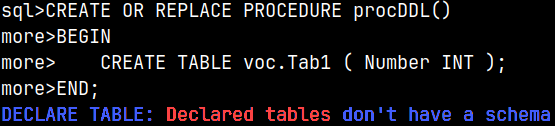
It seems that CREATE TABLE is the same as DECLARE TABLE. We were not using DDL statement, we were just definining a table variable.

Now we know that DDL statements can not be used in Functions and Procedures at all.

Sample Table

CREATE TABLE procTab ( Number INT );
SELECT * FROM procTab;

DML Statements in Procedures

CREATE OR REPLACE PROCEDURE procDML()
BEGIN
    INSERT INTO procTab ( Number ) VALUES ( 1 );
END;
CALL procDML();
  --we call the procedure
SELECT * FROM procTab;

DML statements will work normally inside of procedures.

CREATE OR REPLACE PROCEDURE procDML()
BEGIN
    SELECT * FROM Tab1;
END;
SELECT statement is not allowed in procedures. Procedures don't return values.

Variables and Arguments in Procedures

CREATE OR REPLACE PROCEDURE procVar()
BEGIN
    DECLARE Var1 INTEGER;
    SET Var1 = 2;
    UPDATE procTab SET Number = Var1 WHERE Number = 1;

END;
We can use variables in procedures.  
CALL procVar();
SELECT * FROM procTab;

CREATE PROCEDURE procArg(Arg1 INT)
BEGIN
    UPDATE procTab SET Number = Arg1 WHERE Number = 2;
END;
Procedures can accept arguments.

CALL procArg(3);
SELECT * FROM procTab;

CREATE PROCEDURE procArg(Arg1 INT, Arg2 INT)
BEGIN
    UPDATE procTab SET Number = Arg1 + Arg2 WHERE Number = 3;
END;
We can overload procedures, just like functions.
CALL procArg( 2, 2 );
SELECT * FROM procTab;

When deleting overloaded procedure we have to use the full signature.
DROP PROCEDURE procArg( INT );
DROP PROCEDURE procArg( INT, INT );
DROP ALL PROCEDURE procARG;If we use ALL keyword, then we can delete all of the overloaded functions that share the same name, at once.

Transactions in Procedures

CREATE OR REPLACE PROCEDURE procTrans()
BEGIN
    START TRANSACTION;
    UPDATE procTab SET Number = 5 WHERE Number = 4;

    COMMIT;
END;
                                                                                                   
Because we can not use TCL ( transaction control language ) statemens inside of procedures, then it is not possible to use transaction statements.

CREATE OR REPLACE PROCEDURE procTrans()
BEGIN ATOMIC
    UPDATE procTab SET Number = 5 WHERE Number = 4;
END;
Just like with functions, we have to use ATOMIC keyword
after BEGIN to make procedure one big transaction.

Flow Controls in Procedures

Inside procedures we can use
flow control statements like
CASE, WHILE and IF.  
CREATE OR REPLACE PROCEDURE procCASE(Arg1 CHAR)
BEGIN ATOMIC
     DECLARE Res INT;
     CASE
          WHEN Arg1 = 'A' THEN SET Res = 6;
          ELSE SET Res = 7;
     END CASE;
     UPDATE procTab SET Number = Res;

END;
CALL procCASE( 'A' );
SELECT * FROM procTab;


System Tables

We can read about procedures from sys.functions system table. Procedures are of the type "2". User created procedures have "false" in the system column.
SELECT * FROM sys.functions WHERE name = 'proctrans';

Data about procedures argument can be found in the system table sys.args.
SELECT * FROM sys.args WHERE func_id = 15148;

Nesting Functions and Procedures

We will try to call this function from one other function:
CREATE OR REPLACE FUNCTION funcReturnOne()
RETURNS INTEGER

BEGIN
     RETURN 1;
END;
This is a function calling a function.
CREATE OR REPLACE FUNCTION funcReturnSum()
RETURNS INTEGER

BEGIN
     RETURN funcReturnOne() + 2;
END;
This will work, we can chain functions.

SELECT funcReturnSum();

CREATE OR REPLACE FUNCTION funcProc()
RETURNS INTEGER
BEGIN
     CALL procCASE( 'B' );
     RETURN 1;
END;
This time, we will call procedure from a function. This function will work as expected.
SELECT funcProc();
Procedure "procCASE" will also do its job. It will change the value in "procTab" table.
SELECT * FROM procTab;

It is also possible to nest procedures. This will be inner procedure:
CREATE PROCEDURE procInner()
BEGIN
    UPDATE procTab SET Number = 8 WHERE Number = 7;
END;
This outer procedure will just call inner procedure:
CREATE PROCEDURE procOuter()
BEGIN
    CALL procInner();
END;

CALL procOuter();
Outer procedure will call inner procedure, and inner procedure will update the table.
SELECT * FROM procTab;

Deleting a Procedure

DROP PROCEDURE IF EXISTS procDDL();If we use "IF EXISTS", then deleting of a procedure will never return an error.
If we try to delete not existing procedure, there will be no error, if we use "IF EXISTS".
DROP PROCEDURE IF EXISTS procZZZ();

Function funcProc() is depentand on the procedure "procCASE". That means that we can not delete "procCASE" procedure.DROP PROCEDURE procCASE;
DROP PROCEDURE procCASE CASCADE;We can use CASCADE keyword to delete procedure and all of the depending objects. Now our procedure is deleted.

0430 Python UDFs in MonetDB

Prerequisites for Python UDFs

In order to create Python UDFs, we need to fulfill two prerequisites:
– We have to install the Monetdb-Python3 package. This package is used by MonetDB to communicate with python.
– We have to enable python in each database where we want to create python UDFs (monetdb set embedpy3=true).

How to provide these prerequisites is already explained in one of my previous posts ( 0360 Loader Functions In Monetdb ). Please see this blog post to learn how to enable Python support. Alternatively, you can watch video about loader functions on youtube ( https://youtu.be/2WHb41dzh_A ).

Presence of NumPy and Pandas Packages

In Ubuntu 22.04+, the global Python environment is "externally managed". That means that we have to install numpy and pandas from the official repository.

We can check whether we have numpy and pandas already installed. We don't.
python3 -c "import numpy; print('NumPy installed:', numpy.__version__)"
python3 -c "import pandas; print('Pandas installed:', pandas.__version__)"

Numpy and pandas are available in the ubuntu's repository. We can install them.
sudo apt search python3-numpy; apt search python3-pandas

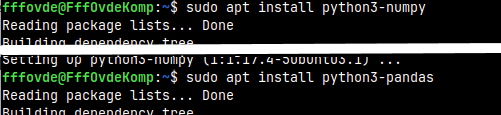
Pandas is depending on numpy, so we will first install numpy.

sudo apt install python3-numpy
sudo apt install python3-pandas

We now have numpy and pandas installed.

Sample Table

CREATE TABLE pyTab ( Letter CHAR, Sign CHAR, Number INTEGER );

INSERT INTO pyTab VALUES ( 'A', '+', 1 ), ( 'A', '-', 2 ), ( 'A', '+', 3 ), ( 'B', null, 4 );


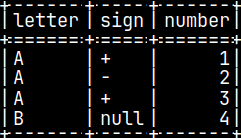
SELECT * FROM pyTab;

Scalar Python UDF

CREATE OR REPLACE FUNCTION pyConcat(val1 CHAR, val2 CHAR)
RETURNS CHAR(2)
LANGUAGE PYTHON {
   return val1 + val2
};
This is simple function that will accept two arguments and will return their concatenation. We can use this function like this:

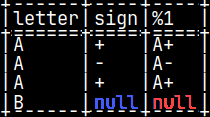
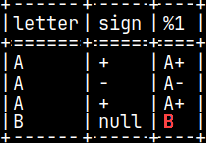
SELECT letter, sign, pyConcat( letter, sign ) FROM pyTab;

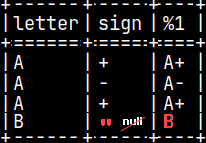
In fourth row, if "sign" is null,
then the result will be null.

We can improve our function by transforming
null values of the arguments into empty strings.  =>
CREATE OR REPLACE FUNCTION pyConcat(val1 CHAR, val2 CHAR)
RETURNS VARCHAR(2)
LANGUAGE PYTHON {
   if isinstance(val1, numpy.ma.MaskedArray):
      val1 = val1.filled('')
   if isinstance(val2, numpy.ma.MaskedArray):
      val2 = val2.filled('')
   return val1 + val2
};

Now, we have "B" in the fourth row. This last example showed us what is the nature of arguments in python UDFs. Arguments are NumPy arrays.

import numpy as np
a = np.array([1, 2, 3, 4])
print("Regular array:", a)           # Regular array: [1 2 3 4]

If we have null in some column, then instead of NumPy array, we will get masked array.  
import numpy.ma as ma
b = ma.array([1, -9999, 3, 4], mask=[False, True, False, False])
print("Sum of Masked array:", b.sum())   # Sum of Masked array: 8
A masked array is a combination of a standard NumPy array and a mask. A mask is used to hide invalid or missing values. After we hide the bad values, we can calculate the sum or average of the masked array without the influence of the bad values.

In our example, we have used "isinstance"  function to examine if we have NumPy array or masked array. For masked array we have replaced bad values with empty string.   if isinstance(val2, numpy.ma.MaskedArray):
      val2 = val2.filled('')

If the value in the fourth row is replaced with an empty string, then the null will now affect final result.

The data type of arguments in Python is directly inferred from the SQL data types, according to this mapping.

BOOLEANnumpy.int8||INTEGERnumpy.int32||FLOATnumpy.float64
TINYINTnumpy.int8||BIGINTnumpy.int64||HUGEINT numpy.float64
SMALLINTnumpy.int16||REALnumpy.float32||STRINGnumpy.object

Returned Value

CREATE OR REPLACE FUNCTION pyConcat(val1 CHAR, val2 CHAR)
RETURNS VARCHAR(2)
LANGUAGE PYTHON {
   return(numpy.array(["A+","A-","A+","ZZ"]))
};
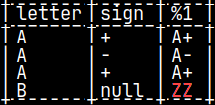
Returned value is also NumPy array. I will create one function that will return the result as a constant.  Notice that I have place "ZZ" as the last element.


This function will work just fine. We'll get our result.

SELECT letter, sign, pyConcat( letter, sign ) FROM pyTab;


CREATE OR REPLACE FUNCTION pyConcat(val1 CHAR, val2 CHAR)
RETURNS VARCHAR(2)
LANGUAGE PYTHON {
   return( 3 )
};
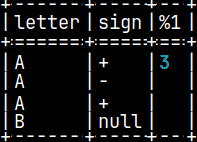
This is what will happen if we return scaler.

CREATE OR REPLACE FUNCTION pyConcat(val1 CHAR, val2 CHAR)
RETURNS VARCHAR(2)
LANGUAGE PYTHON {
   return( ( 1, 2 ) )
};
If we return a tuple, we will get this message.

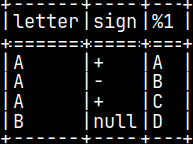
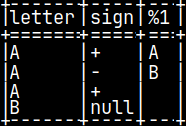
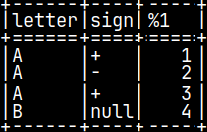
Let's try to return list, dictionary or pandas data frame. We'll call our functions with "SELECT letter, sign, Ret() FROM pyTab;".

CREATE OR REPLACE FUNCTION Ret()
RETURNS CHAR
LANGUAGE PYTHON {

   return( ['A','B','C','D'] )
};
                                                           
CREATE OR REPLACE FUNCTION Ret()
RETURNS CHAR
LANGUAGE PYTHON {

   return( {"result":['A','B'] } )
};
                                                                  
CREATE OR REPLACE FUNCTION Ret() RETURNS INTEGER
LANGUAGE PYTHON {
     import pandas as pd -- must import pandas      return(pd.DataFrame({'result':[1,2,3,4]}))
};
                                                                                         

Python Traps

CREATE OR REPLACE FUNCTION funcCase(Letter CHAR)
RETURNS CHAR
LANGUAGE PYTHON {
    return( Letter )
};
If we try to call this function, we'll get an error.
SELECT funcCase('A');

Because python is case sensitive and SQL is not, names of arguments will be turned into lower letters in python script.
Instead of "return( Letter )", we have to type "return( letter )". Arguments inside of python script have to be in lower letters.After the change, this function will work.
SELECT funcCase('A');

Python is, of course, sensitive to indentation.
Indentation must be consistent.
We'll get an error if it is not.
CREATE OR REPLACE FUNCTION funcIndent()
RETURNS CHAR
LANGUAGE PYTHON {
      a = 3
   return a
};
SELECT funcIndent();  

Creating a Table with Python UDF

CREATE FUNCTION funcTab()
RETURNS TABLE (Letter CHAR, Number INT)
LANGUAGE PYTHON {
   result = dict()
   result['letter'] = ['A', 'B']
   result['number'] = [1, 33]
   return result
};
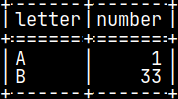
Python dictionary can be used to create table with python.
SELECT * FROM funcTab();

Use Python Function to Filter Data

CREATE OR REPLACE FUNCTION funcBoolean(Number INT)
RETURNS BOOLEAN
LANGUAGE PYTHON
{ return number % 2 };
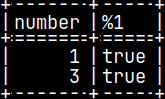
If python function is returning TRUE and FALSE, we can use it as a filter.
SELECT Number, funcBoolean( Number )
FROM pyTab
WHERE funcBoolean( Number );  

Aggregate UDFs

We can group table values with this SQL statement:
SELECT Letter, SUM( Number )
FROM pyTab

GROUP BY Letter;        
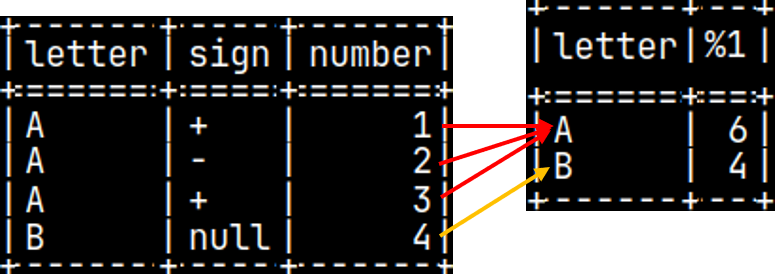
SQL statement is using built-in SQL function to aggregate values. We can do the same with python UDF. Let's make UDF function pySUM( Val ).
SELECT Letter, pySUM( Number )
FROM pyTab

GROUP BY Letter;

Aggregate function argument is a column to aggregate. We will use Number column. This column will be NumPy array.
np.array([1, 2, 3, 4])

Beside this, aggregate function needs to know what row belongs to what group.
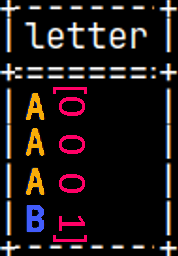
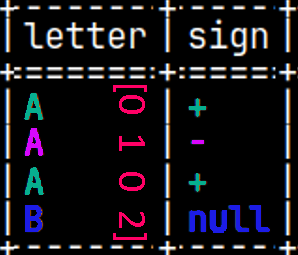
Groups will also be presented with a NumPy array. If we are grouping only by Letter column, our array will show that we only have 2 groups (0,1). If we group by Letter and Sign columns, then array will have 3 groups (0,1,2). This array is always one dimensional and always have the name "aggr_group".
np.array([0, 0, 0, 1])

np.array([0, 1, 0, 2])

So, inputs for our function are "val = np.array([1, 2, 3, 4])" and "aggr_group = np.array([0, 0, 0, 1])". On the left side bellow, we have our function. On the right side we can see interim results and pseudo code.

  
CREATE OR REPLACE AGGREGATE pySUM(val INTEGER)
RETURNS INTEGER LANGUAGE PYTHON {

   unique = numpy.unique(aggr_group)
   x = numpy.zeros(shape=(unique.size))
   for i in range(0, unique.size):
      x[i] = numpy.sum(val[aggr_group==unique[i]])
   return(x)
};
val = np.array([1, 2, 3, 4]) #we start with val and aggr_group
aggr_group = np.array([0, 0, 0, 1])

 
unique = np.array([0, 1]) #we remove duplicates
x = np.array([0, 0]) #result array, but filled with zeros
for i from 0 to 1 #for each group

   x[0] = sum([1, 2, 3, 4] where [0, 0, 0, 1] = 0 ) = 6 #for A
   x[1] = sum([1, 2, 3, 4] where [0, 0, 0, 1] = 1 ) = 4 #for B
return np.array( 6, 4 )

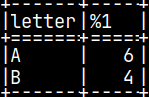
We will run our statement:
SELECT Letter, pySUM( Number )
FROM pyTab
GROUP BY Letter;

If we try to apply our function without grouping, we'll get an error.
SELECT pySUM( Number )
FROM pyTab;
If there are no groups, then "aggr_group" is not defined.

CREATE OR REPLACE AGGREGATE pySUM(val INTEGER)
RETURNS INTEGER LANGUAGE PYTHON {
    try:
        unique = numpy.unique(aggr_group)
        x = numpy.zeros(shape=(unique.size))
        for i in range(0, unique.size):
            x[i] = numpy.sum(val[aggr_group==unique[i]])
    except NameError:
        x = numpy.sum(val) # aggregate on all data
    return(x) };
We have to catch the error above with "try".

We can provide alternative result with "except NameError", that will not use "aggr_group". We will now aggregate the whole column.

SELECT pySUM( Number ) FROM pyTab;

The result without grouping is 10.

System Tables

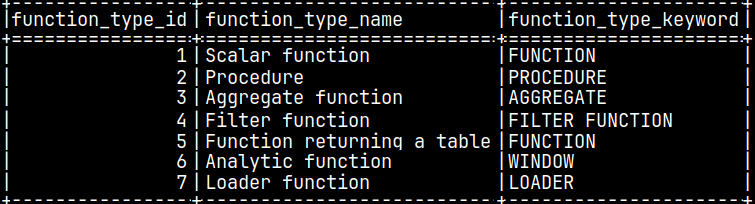
In system table "sys.function_types", we can see that aggregate functions are type 3, and scalar functions are type 1. Functions that return table are type 5.

SELECT * FROM sys.function_types;

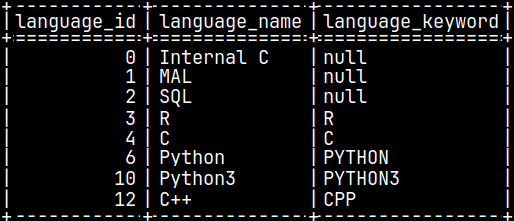
In system table "sys.function_languages", we can see what programming languages can we use to create functions.

SELECT * FROM sys.function_languages;

We can use language and function type to search for our Python functions in system table "sys.functions".

SELECT * FROM sys.functions WHERE Name = 'ret';

0420 Custom Functions in MonetDB part 3

WHILE statement

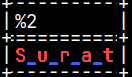
In procedural SQL, WHILE statement is used for iterative statement where we repeat a block of SQL code as long as a specified condition is true. In the example bellow, we will repeat the loop 5 times, because our argument has 5 letters = length ( 'Surat' ).

CREATE OR REPLACE FUNCTION funcWhile( argWord VARCHAR(20) )
RETURNS STRING
BEGIN
    DECLARE i INT; SET i = 1;
    DECLARE Res VARCHAR(40); SET Res = '';
    WHILE i <= length( argWord ) DO
        SET Res = Res || '_' || SUBSTRING( argWord, i, 1 );
        SET i = i + 1;
    END WHILE;
    RETURN TRIM( Res, '_' );
END;
(1)     '' + '_' + Surat = _S
(2)     _S + '_' + Surat = _S_u
(3)     _S_u +
'_' + Surat = _S_u_r
(4)     _S_u_r +
'_' + Surat = _S_u_r_a
(5)     _S_u_r_a + '_' + Surat = _S_u_r_a_t


TRIM( _S_u_r_a_t, '_' ) = S_u_r_a_t

SELECT funcWhile('Surat');  

This example will return the smallest number X for which 2X >= argument.

SELECT funcExponential(7);


CREATE OR REPLACE FUNCTION funcExponential( argNumber INTEGER )
RETURNS INTEGER
BEGIN
    DECLARE X INT; SET X = 1;
    WHILE POWER( 2, X ) < argNumber DO
        SET X = X + 1;
    END WHILE;
    RETURN X;
END;

CREATE OR REPLACE FUNCTION funcFactorial( argNumber INTEGER )
RETURNS INTEGER
BEGIN
    DECLARE Res INTEGER; SET Res = 1;
    WHILE 1 < argNumber DO
        SET Res = Res * argNumber;
        SET argNumber = argNumber - 1;
    END WHILE;
    RETURN Res;
END;
This is an example where we are calculating factorial of an argument.

SELECT funcWhile(4);


Infinite Loop

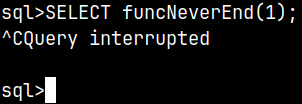
If we made a mistake, our WHILE statement can create an infinite loop. In that case, solution is to violentely break the process. In mclient we can exit by typing "Ctrl + C" to exit execution.

CREATE OR REPLACE FUNCTION funcNeverEnd( argNumber INTEGER )
RETURNS INTEGER
BEGIN
    WHILE 1 = 1 DO
        SET argNumber = argNumber + 1;
    END WHILE;
    RETURN argNumber;
END;
SELECT funcNeverEnd(1);

Nesting WHILE

It is possible to nest WHILE statement inside of another WHILE statement.

SELECT * FROM funcNested();

CREATE OR REPLACE FUNCTION funcNested()
RETURNS TABLE( Res INT )
BEGIN
    DECLARE i INT; SET i = 1;
    DECLARE j INT;
    DECLARE TABLE tabRes ( Res INT );
    WHILE i <= 2 DO
        SET j = 1;
        WHILE j <= 2 DO
            INSERT INTO tabRes VALUES ( i * 10 + j );
            SET j = j + 1;
        END WHILE;

        SET i = i + 1;
    END WHILE;

    RETURN tabRes;
END;

IF Statement in Procedural SQL

For conditional logic we can use IF statement.
CREATE OR REPLACE FUNCTION funcIF()
RETURNS INTEGER
BEGIN
    IF ( 1 = 2 )
    THEN RETURN 1;
    ELSE RETURN 2;
    END IF;
END;
Because 1 <> 2, the returned value is 2.

SELECT funcIF();

It is also possible to have several conditions inside of the IF statement.
CREATE OR REPLACE FUNCTION funcIF()
RETURNS INTEGER
BEGIN
    IF ( 1 = 2 ) THEN RETURN 1;
    ELSEIF ( 1 = 2 ) THEN RETURN 2;
    ELSEIF ( 1 = 1 ) THEN RETURN 3;
    ELSE RETURN 3;
    END IF;
END;
One of these conditions is TRUE, so the final result will be 3.

SELECT funcIF();

Breaking WHILE Loop

MonetDB doesn't support BREAK keyword in a WHILE loop. We have to use flag variable to mark when we want to exit the loop.

We will set our flag variable to one value, and we will examine whether it has that value at the start of each cycle. Inside of the loop we can change the value of a flag variable when conditions are met. That change will make condition of a loop to fail.
SELECT funcBREAK(); 
CREATE OR REPLACE FUNCTION funcBREAK()
RETURNS INTEGER
BEGIN
    DECLARE i INTEGER; SET i = 1;
    DECLARE Flag INTEGER; SET Flag = 0;
    WHILE i <= 10 AND Flag = 0 DO
        SET i = i + 1;
        IF i = 5 THEN
            SET Flag = 1;
        END IF;
    END WHILE;
    RETURN i;
END;

Skip Some Cycles in a WHILE Loop

MonetDB doesn't support CONTINUE keyword in a WHILE loop. If we want to conditionally skip some cycles, we should wrap our statements in the IF function.

In the example to the right, we are calculating total of the numbers between 1 and 10, but we are skipping all the even numbers. Result should be 1+3+5+7+9=25.  
SELECT funcCONTINUE();
CREATE OR REPLACE FUNCTION funcCONTINUE()
RETURNS INT
BEGIN
    DECLARE i INT; SET i = 1;
    DECLARE Res INT; SET Res = 0;
    WHILE i < 10 DO
        IF MOD( i, 2 ) <> 0  THEN
            SET Res = Res + i;
        END IF;
        SET i = i + 1;
    END WHILE;
    RETURN Res;
END;

Functions Overloading

In the same schema it is possible to create several functions with the same name. Trick is that these functions must have different arguments. I will create three simple functions.

CREATE FUNCTION funcOverload()
RETURNS INTEGER BEGIN
    RETURN 1;
END;
CREATE FUNCTION funcOverload(A INT)
RETURNS INTEGER
BEGIN
    RETURN A;
END;
CREATE FUNCTION funcOverload(A INT, B INT) RETURNS INTEGER
BEGIN
    RETURN A + B;
END;

Creation was successful so we can now test our functions:

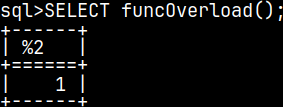
SELECT funcOverload();
SELECT funcOverload(5);

SELECT funcOverload(20,5);

Deleting of Overloaded Functions

When we try to delete overloaded function, MonetDB will complain that we have to provide the full signature of a function.
DROP FUNCTION funcOverload;

I will delete the version of the function, with one argument, by using full signature.

DROP FUNCTION funcOverload(INT);
Now this version doesn't work.
Other functions still work.

System Tables

System table sys.functions contains all of our functions.  

SELECT * FROM sys.functions WHERE name = 'funcneverend';

If we want to list all of the functions that are created by us, we have to filter out system functions.

SELECT * FROM sys.functions WHERE system = false;
Function "funcNeverEnd" has ID 14331. We can use that fact to read about its arguments.
SELECT * FROM sys.args WHERE func_id = 14331;

There will always be one argument named "result". This is the argument that represents the value that the function will return.

0410 Custom Functions in MonetDB part 2

Table Variables

Table variables are temporary in-memory structures. They exist only during the execution of a function. They are mostly used to build up a result set that will be returned from the function. They can be also used as intermediate result storage for procedural logic.

CREATE FUNCTION funcTableDeclaration()
RETURNS TABLE ( Id INTEGER )
BEGIN
   DECLARE TABLE TableDeclaration ( Id INTEGER );
   INSERT INTO TableDeclaration VALUES ( 1 );        RETURN SELECT * FROM TableDeclaration;
END;                                                           
SELECT * FROM funcTableDeclaration();
Tables created with DECLARE TABLE statement are mutable and can be modified by using any of the DML statements like INSERT INTO, UPDATE, DELETE…

It is also possible to create a table variable based on an existing table, but without inheriting the data. I will create a sample table:

CREATE TABLE sys.tabNum ( Number INTEGER );
INSERT INTO tabNum ( Number ) VALUES ( 32 );
SELECT * FROM tabNum;


CREATE OR REPLACE FUNCTION funcTableDeclaration()
RETURNS TABLE( N INTEGER )
BEGIN
   DECLARE TABLE TableDeclaration AS ( SELECT * FROM tabNum ) WITH DATA;
   RETURN SELECT * FROM TableDeclaration;
END;
We have created table variable based on the sample table.

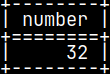
SELECT * FROM funcTableDeclaration();
No inherited data, WITH DATA is not in effect.

Limitations of the Table Variables

CREATE OR REPLACE FUNCTION funcTableDeclaration()
RETURNS TABLE ( Id INTEGER )
BEGIN
   DECLARE TABLE TableDeclaration ( Id INTEGER PRIMARY KEY );
   INSERT INTO TableDeclaration VALUES ( 1 );
   RETURN SELECT * FROM TableDeclaration;
END;
We can not have constraints on the table variables.  

CREATE OR REPLACE FUNCTION funcTableDeclaration()
RETURNS TABLE( Id INTEGER )
BEGIN    
   DECLARE TABLE TableDeclaration ( Id INTEGER );
   INSERT INTO TableDeclaration VALUES ( 1 );
   ALTER TABLE TableDeclaration RENAME COLUMN Id to Code;
   RETURN SELECT * FROM TableDeclaration;
END;
It is not possible to apply ALTER TABLE on the table variable.  

Declare Scaler Variable

CREATE FUNCTION funcVariableDeclaration()
RETURNS INTEGER
BEGIN
   DECLARE Var1 INTEGER;
   SET Var1 = 77;
   SET Var1 = 88;
   RETURN SELECT Var1;
END;
It is possible to declare and set scaler variable.
Scaler variables are mutable, and we can change their values several times.

SELECT funcVariableDeclaration();

CREATE OR REPLACE FUNCTION funcVariableDeclaration()
RETURNS TABLE ( Var1 INTEGER, VAR2 CHAR )
BEGIN
   DECLARE Var1 INTEGER, Var2 CHAR;
   SET Var1 = 77;
   SET Var2 = 'A';
   RETURN SELECT Var1, Var2;
END;
We can declare two variables in one statement.

SELECT * FROM funcVariableDeclaration();

CREATE OR REPLACE FUNCTION funcVariableDeclaration()
RETURNS TABLE ( Var1 INTEGER, VAR2 CHAR )
   BEGIN
   DECLARE Var1 INTEGER, Var2 CHAR;
   SELECT 1, 'A' INTO Var1, Var2;
   RETURN SELECT Var1, Var2;
END;
Beside declaring two variables at once, we can also set the
values of the both variables by the "SELECT INTO" statement.


Expressions for Values

CREATE OR REPLACE FUNCTION funcVariableDeclaration()
RETURNS INTEGER
BEGIN
   DECLARE Var1 INTEGER;
   SET Var1 = 32 + 5;
   RETURN SELECT Var1;
END;
Result of an expression can be assigned as a variable value.

SELECT funcVariableDeclaration();


CREATE OR REPLACE FUNCTION funcVariableDeclaration()
RETURNS INTEGER
BEGIN    
   DECLARE Var1 INTEGER;
   SET Var1 = ( SELECT * FROM tabNum );
   DECLARE Var2 INTEGER;
   SET Var2 = Var1 + 5;
   RETURN SELECT Var2;
END;
Result of a query can be assigned to a variable.  

SELECT funcVariableDeclaration();

CREATE OR REPLACE FUNCTION funcVariableDeclaration()
RETURNS INTEGER
BEGIN
   DECLARE Var1 INTEGER;
   SET Var1 = ( SELECT * FROM tabNum ) + 5;
   RETURN SELECT Var1;
END;
We can also use this shorter syntax.

CREATE OR REPLACE FUNCTION funcVariableDeclaration()
RETURNS INTEGER
BEGIN    
   DECLARE Var1 INTEGER, Var2 INTEGER;
   SET ( Var1, Var2 ) = ( SELECT Number, Number FROM tabNum );       RETURN Var1 / Var2;
END;
If the query is returning one row with several columns, we can assign all of those values to several variables in one statement.

Usage of the Scaler Variables

Scaler variables are, also, temporary in-memory structures. We can use them anywhere where we can use constants:

CREATE OR REPLACE FUNCTION funcVariableDeclaration()
RETURNS INTEGER
BEGIN
   DECLARE Var1 INTEGER;
   SET Var1 = 32;
   RETURN SELECT * FROM tabNum WHERE Number = Var1;
END;
SELECT funcVariableDeclaration();

But we can not use scaler variable to give a name to a column of a table variable. We can not use variables instead of the identifiers:

CREATE OR REPLACE FUNCTION funcTableDeclaration()
RETURNS TABLE ( Id INTEGER )
BEGIN
   DECLARE Var1 CHAR;
   SET Var1 = 'N';
   DECLARE TABLE TableDeclaration ( Var1 INTEGER );    
   RETURN SELECT N FROM TableDeclaration;
END;
SELECT * FROM funcTableDeclaration();  

CREATE OR REPLACE FUNCTION funcVariableDeclaration()
RETURNS INTEGER
BEGIN
   DECLARE Var1 INTEGER;
   RETURN SELECT Var1;
END;
Variable without assigned value will be NULL.

SELECT funcVariableDeclaration();

Control Flow With CASE

In a police lineup, a witness goes from left to right, scanning each person. When the witness recognizes the culprit, he stops scanning.

This is how the CASE control flow structure works. We examine the values ​​one by one until we find a value that matches the description.

Search CASE

CREATE OR REPLACE FUNCTION funcCASE( argNumber INTEGER )
RETURNS CHAR
BEGIN    
   DECLARE Res CHAR;    
   CASE          
      WHEN argNumber = 1 THEN SET Res = 'A';
      WHEN argNumber = 2 THEN SET Res = 'B';
      ELSE SET Res = 'C';    
   END CASE;
   RETURN Res;
END;
CASE statement is made of conditions checks ( WHEN subclause ) and
the results ( THEN subclause ) when the condition is met.

The results must be complete statements. In this case, it is a SET statement.
If none of the conditions is met, we will return the statement after the "ELSE" keyword.


SELECT funcCASE( 1 );

SELECT funcCASE( 2 );

SELECT funcCASE( 99 );

CREATE OR REPLACE FUNCTION funcCASE( argNumber INTEGER )
RETURNS CHAR

BEGIN
   DECLARE Res CHAR;
   CASE
      WHEN argNumber < 3 THEN SET Res = 'A';
      WHEN argNumber < 5 THEN SET Res = 'B';
      ELSE SET Res = 'C';
   END CASE;
   RETURN Res;
END;
If the conditions overlap, the condition closer to the top of the list will win.
For example, if argNumber is "2", then both the conditions "2 < 3" and "2 < 5" will be true.
The final result will be the letter "A", because it is related to the top condition in the list.

SELECT funcCASE( 2 );


Simple CASE

CREATE OR REPLACE FUNCTION funcCASE( argNumber INTEGER )
RETURNS CHAR
BEGIN     
   DECLARE Res CHAR;     
   CASE argNumber
      WHEN 1 THEN SET Res = 'A';
      WHEN 2 THEN SET Res = 'B';
      ELSE SET Res = 'D';     
   END CASE;     
   RETURN Res;
END;
This here is a shorthand for writing the conditions "ArgNumber = 1" and "ArgNumber = 2".
This syntax is only useful when we are sure that we will only use equality-based conditions.  

SELECT funcCASE( 2 );
 

On the other hand, when we use "Search CASE" then we can use whatever condition we want.

Nested CASE and Default Result of the CASE statement

CREATE OR REPLACE FUNCTION funcCASE( argNumber INTEGER )
RETURNS CHAR
BEGIN
   DECLARE Res CHAR;
   CASE
      WHEN argNumber = 1 THEN SET Res = 'A';

      CASE
   
      WHEN argNumber = 2 THEN SET Res = 'B';
   
   END CASE;
   END CASE;
   RETURN Res;
END;
We can nest CASE structures, one inside of another.

Notice that this time we don't have ELSE substatement. In that case
every value of the argument, except 1 and 2, will cause the function to return NULL.

SELECT funcCASE( 99 );