For convenience we will create certificate chains contained in one file.
Intermediate + CA Certificate
For certificate chain verification it is convenient to store Intermediate and CA certificates in one file, in that order. We will create a new folder for storing this chain. This folder "ipublic" will be inside of the intermediate CA folder "iCA".
During TLS handshake, the server will send the whole certificate chain except the root certificate. It is convenient to store these chains in "cert" folders. Each leaf subject has such folder ( "scerts, pcerts, ccerts" ).
The leaf certificates are revoked by using Intermediate CA. In the "iindex.txt" file we currently have three issued certificates.
We issued certificates for the server, person and web client.
I will revoke person's certificate.
cd iCA
openssl ca -config iCA.cnf -revoke ../person/pcerts/pera.crt -crl_reason keyCompromise
In the "iindex.txt" file, person's certificate is labeled with "R".
We will create new CRl file. We will place it into "icrl" folder.
openssl ca -config iCA.cnf -gencrl -out ./icrl/iCA.crl
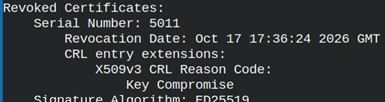
We can read from this CRL file. Inside of it we will see that the certificate with the serial number 5011 is revoked. openssl crl -in ./icrl/iCA.crl -noout -text
There are two ways to verify the certificate revocation. We can check only the leaf certificate revocation status, or we can check both leaf and intermediate certificate revocation status.
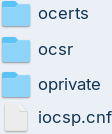
OCSP responses must be signed by the intermediate CA. For OCSP we must create a directory system, just like we have created for server, person and web client. This directory system will be inside of the "/iCA/iOCSP" folder.
We can verify purpose of this certificate. openssl verify -CAfile ./ipublic/CA-chain.crt -purpose ocsphelper ./iocsp/ocerts/iocsp.crt
OpenSSL OCSP Command
OpenSSL can create a simple OCSP responder. This responder is not suitable for production. It should be only use for demonstration and testing. We will use OCSP command to show how OCSP works.
In the "iCA" configuration file, we can find that address for the OCSP service is "http://ocsp.example.com:7000". Our educational OCSP responder will not use this address, but will use a localhost.
I will start the responder on the port 7000. Responses from this responder will be valid for one day. This responder will read from the "iindex.txt" file to see which certificates are valid and which are revoked.
For this certificate we will see that the certificate has been revoked.
The possible answers for OCSP service are "good, revoked, unknown".
Mutual TLS With the Web Client
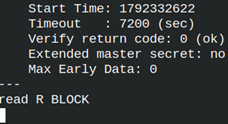
We can use "s_server" and "s_client" to show how mutual TLS verification works. Mutual TLS means that both sides have their own key and certificate. With mutual TLS both sides can be verified. I will start "s_server" in the new tab. My working directory is "iCA".
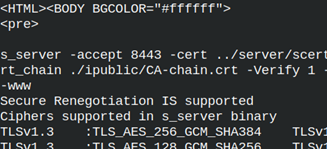
"-Verify 1" option means that we are allowing only one intermediate CA. Root CA "myCA.crt" is trusted, and below it there can be only one intermediate certificate in the chain "CA-chain.crt".
Option "-www" means that "s_server" will run like a simple web server.
I will go back to original tab. We will connect with "s_client" to our server.
This is interactive prompt on the side of the client. Here we can enter this GET request: GET / HTTP/1.0
As a response we will get a long text. That text is HTML page containing TLS connection information.
Exporting PKCS#12 Key
We can export web client certificate to PKCS#12 format which is convenient for Android and Windows clients. It will go to "cp12" folder.
openssl pkcs12 -export-name "Friendly Name of Certificate" -inkey ../client/cprivate/client.key -in ../client/ccerts/client.crt -certfile ./ipublic/CA-chain.crt -out ../client/cp12/client.p12 # enter password two times






 This is the response that we will get. "
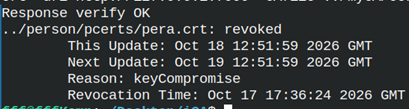 For this certificate we will see that the certificate has been revoked.
 We will get interactive prompt.