We will create a leaf certificate for our server.
Server Certificate Configuration
Creation of a Directory System and Configuration File
I will use letter "s" as a prefix to label server directories. I will not apply permissions, because this is just demonstration.
cd /home/fff/Desktop | This is our working directory. | |
mkdir server | This will be our root folder. I will jump to it "cd server". | chmod 700 server |
mkdir sprivate | In this folder we will save server private key. | chmod 700 private |
mkdir scsr | Folder for the CSR request. | chmod 755 csr chmod 644 csr/* |
mkdir scerts | We will place certificate in this directory. | chmod 755 certs chmod 644 certs/* |
mkdir sp12 | Here we will save certificate and key as PKCS#12 container. | chmod 755 sp12 chmod 644 sp12/* |
touch server.cnf | Configuration file. | chmod 644 server.cnf |
Server Configuration File
We will paste this text into our configuration file.
[req] | This time we don't have "ca" section. |
[server_dn] | Distinguish name of our server. Per the intermediate CA policy, we must supply "commonName". |
[server_req_ext] | All other extensions are defined inside of the intermediate CA configuration file. |
[server_alt_names] | We will use the certificate to sign several domains. |
Creation of a Private Key and Certificate
| We will create the new private key. | openssl genpkey -algorithm ed25519 -out sprivate/server.key |
We should never encrypt this file. The server will have to access this key so I will leave it unencrypted.
| We will create CSR request. | openssl req -new -config server.cnf -key sprivate/server.key -out scsr/server.csr |
We can read this CSR and verify it, in the same time. openssl req -in scsr/server.csr -noout -text -verify | 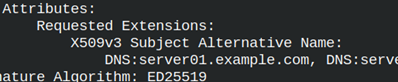 SAN is the only extension. SAN is the only extension. |
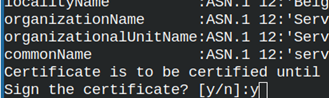
We will copy CSR to intermediate CA directory. cp scsr/server.csr ../iCA/icsr/server.csr We will jump to intermediate CA folder. From there we can sign the CSR. cd /home/fff/Desktop/iCA We can now create certificate. We will confirm signing. We will write to the "index.txt" that belongs to intermediate CA. openssl ca -config iCA.cnf -extfile iCA.cnf -extensions v3_server -in icsr/server.csr -out ../server/scerts/server.crt |
  |
We can read from our certificate. openssl x509 -in ../server/scerts/server.crt -noout -textInside of it we will find all of the extensions from the iCA.cnf file, but we will not find SAN extension. We have to fix this problem! | 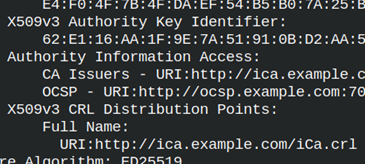 |
How to Include SAN extension?
Our extensions are currently inside of the intermediate ca "iCA.cnf" configuration file, while SAN extension is inside of the leaf "server.cnf" configuration file. The "ca" command will only accept extensions from one configuration file. We have somehow to consolidate these 2 files.
The solution is to use "include" command. We must go back to "iCA.cnf" file, and there we must include SAN extension.At the top of this configuration file, we will place include command: .include ../server/server.cnfIn the section " v3_server", of "iCA.cnf" file, I will add SAN extension. | [v3_server] basicConstraints = critical,CA:false keyUsage = critical,digitalSignature extendedKeyUsage = serverAuth subjectKeyIdentifier = hash authorityKeyIdentifier= keyid:always,issuer authorityInfoAccess = @issuer_info crlDistributionPoints = @crl_info |
| Now, I will again try to create correct certificate. We can verify certificate by reading from it. |
openssl ca -config iCA.cnf -extfile iCA.cnf -extensions v3_server -in icsr/server.csr -out ../server/scerts/server.crt |
openssl x509 -in ../server/scerts/server.crt -noout -text This time we will have all the extensions, including SAN. |  |
Verifying the Certificate
We can verify the certificate.openssl verify -CAfile icerts/iCA.crt ../server/scerts/server.crt | We can not verify it by using only intermediate CA certificate. We need the whole chain. |
openssl verify -CAfile ../myCA/certs/myCA.crt -untrusted icerts/iCA.crt ../server/scerts/server.crt |  |
We can also join both CA certificates into one file. Intermediate CA certificate must be first. We are starting from the bottom of a hierarchy. cat icerts/iCA.crt ../myCA/certs/myCA.crt > /home/fff/Desktop/all.crt Now we have both certificates in one file. | 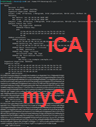 |
We can verify the server certificate with the certificate chain file.openssl verify -CAfile /home/fff/Desktop/all.crt ../server/scerts/server.crt | ../server/scerts/server.crt: OK |
We can verify purpose and hostname of a certificate as a separate property.
openssl verify -purpose sslserver -CAfile /home/fff/Desktop/all.crt ../server/scerts/server.crt | ../server/scerts/server.crt: OK |
openssl verify -verify_hostname server01.example.com -CAfile /home/fff/Desktop/all.crt ../server/scerts/server.crt | ../server/scerts/server.crt: OK |
Person Certificate Configuration
Creation of a Directory System and Configuration File for a Person
cd /home/fff/Desktop | This is our working directory. | |
mkdir person | This will be our root folder. I will jump to it "cd person". | chmod 700 person |
mkdir pprivate | In this folder we will save server private key. | chmod 700 pprivate |
mkdir pcsr | Folder for the CSR request. | chmod 755 pcsr chmod 644 pcsr/* |
mkdir pcerts | We will place certificate in this directory. | chmod 755 pcerts chmod 644 pcerts/* |
mkdir pp12 | Here we will save certificate and key as PKCS#12 container. | chmod 755 pp12 chmod 644 pp12/* |
touch person.cnf | Configuration file. | chmod 644 person.cnf |
Person's Configuration File
This will be the text in the configuration file.
[req] | We don't need "ca" section, only "req". |
[person_dn] | Distinguish name of person. Per the intermediate CA policy, we must supply "commonName". |
[person_req_ext] | All other extensions are defined inside of the intermediate CA configuration file. |
[person_alt_names] email.1 = pera@example.com | We will use the certificate to verify ownership of a mail address. |
Person's Private Key and a CRS File
| First, we will create a private key. | openssl genpkey -algorithm ed25519 -out pprivate/pera.key |
| We'll use key to create CSR file. | openssl req -new -config person.cnf -key pprivate/pera.key -out pcsr/pera.csr |
We will verify CSR file. openssl req -in pcsr/pera.csr -noout -text -verify | 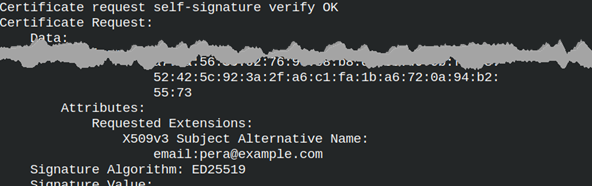 |
| We must copy CSR file to iCA folder. | cp pcsr/pera.csr ../iCA/icsr/pera.csr |
Person's Certificate
In order to include SAN extension in the certificate, we must include person configuration file in the "iCA" configuration file. At the top of the " iCA" configuration file we will add this line. .include ../person/person.cnf In the " usr_cert" section, of the "iCA" file, we will add SAN extension. | [usr_cert] |
We will jump to "iCA" folder before signing the certificate, "cd ../iCA". |
openssl ca -config iCA.cnf -extfile iCA.cnf -extensions usr_cert -in icsr/pera.csr -out ../person/pcerts/pera.crt |
We can list the purpose of the "pera.crt" certificate.openssl x509 -in ../person/pcerts/pera.crt -noout -purposeAs a result, we will get a list of the purposes for which we can use this certificate. | 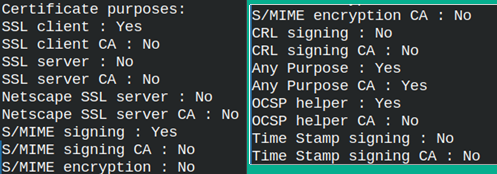 |
Person's Certificate Verification
We can now verify the certificate.
openssl verify -CAfile ../myCA/certs/myCA.crt -untrusted icerts/iCA.crt ../person/pcerts/pera.crt | ../person/pcerts/pera.crt:OK |
openssl verify -purpose sslclient -CAfile ../myCA/certs/myCA.crt -untrusted icerts/iCA.crt ../person/pcerts/pera.crt | ../person/pcerts/pera.crt:OK |
openssl verify -verify_email pera@example.com -CAfile ../myCA/certs/myCA.crt -untrusted icerts/iCA.crt ../person/pcerts/pera.crt | ../person/pcerts/pera.crt:OK |
Web Client Certificate Configuration
Web Client Files and Folders
Configuration for a web client is almost the same as for the Person, so I will just run through the settings.
cd /home/fff/Desktop | chmod 700 client chmod 700 cprivate chmod 600 cprivate/* chmod 755 ccsr chmod 644 ccsr/* chmod 755 ccerts chmod 644 ccerts/* chmod 755 cp12 chmod 644 cp12/* chmod 644 client.cnf | [req] | We have only changed the names of folders, and distinguished name. Web client doesn't have SAN extension. Other client extensions are inside of the " iCA" configuration file. |
Creation of Key and Certificate for the Web Client
| We will create a private key for a web client. | openssl genpkey -algorithm ed25519 -out cprivate/client.key |
| With the key we will create and verify CSR file. | openssl req -new -config client.cnf -key cprivate/client.key -out ccsr/client.csropenssl req -in ccsr/client.csr -noout -text -verify |
| We will copy CSR file, and we will jump to iCA folder. | cp ccsr/client.csr ../iCA/icsr/client.csr cd ../iCA |
We can now create a certificate. openssl ca -config iCA.cnf -extfile iCA.cnf -extensions client_cert -in icsr/client.csr -out ../client/ccerts/client.crt |
| We can verify this certificate too. We can verify certificate chain, and we can verify its purpose. |
openssl verify -CAfile ../myCA/certs/myCA.crt -untrusted icerts/iCA.crt ../client/ccerts/client.crt # OK |
openssl verify -purpose sslclient -CAfile ../myCA/certs/myCA.crt -untrusted icerts/iCA.crt ../client/ccerts/client.crt # OK |