OpenSSL can be used to create a CA that we manage. A private CA is useful for creating an internal PKI and gaining control over internally used certificates. A private CA can be the best solution in networks that do not have access to the Internet. Without the Internet, it is not possible to access commercial CRL and OCSP services.
For larger projects, enterprises use dedicated software that provides web interface, access control, auditing. Examples of such software are Dogtag Certificate System, Microsoft Active Directory Certificate Services, HashiCorp Vault.
Creation of Your Own CA
We will use name "myCA" to refer to CA that we will create.
Directory Structure
Everything needed for "myCA" must be placed into one directory system. At the top we will have "myCA" folder, other files/folders are inside of the "myCA" folder.
| private | This is a folder where we will store the "myCA" private key. |
| newcerts | Every certificate signed by the "myCA" will be stored here. Names of the files will be certificate serial numbers. This folder is used by OpenSSL to keep track of issued certificates, revocations, and duplicates. |
| index.txt | This is file that stores a list of all of the issued certificates.V 280101120000Z 1000 unknown /CN=server1 # valid |
| serial.txt | This file will store the serial number for a new certificate. If that number is "X", the next certificate will be given serial number "X", and OpenSSL will update this text file to store the next serial number, which would be "X+1". |
| certs | This directory is optional. Here we can place any certificate, and we can give meaningful names to those files. We can store here "myCA" certificate, and we can organize certificate chains for deployment. |
| csr | Convinient folder where we can place intermediate CA CSR's. |
| crl | This is folder where we keep our CRL list. |
| crlnumber.txt | This file is similar to "serial". It holds the number for the next version of CRL list. |
| myCA.cnf | This is configuration file used by the "myCA". |
Creation of a Directory Structure
We will create files/folders needed for "myCA". We will place initial values into some of the files. |  |
cd /home/fff/Desktop | This is our current directory. | |
mkdir myCA | We will make root folder. We will jump to that folder. | cd myCA |
mkdir private | This empty folder is for a private key. | |
mkdir newcerts | Issued certificates will be stored here. | |
touch index.txt | Here we will register newly issued certificates. | |
touch serial.txt | Inside of this file we will write initial hexadecimal serial number 2730. | echo 2730 > serial.txt #even number of digits |
mkdir certs | This folder is optional. | |
mkdir csr | Here we will place CSRs for intermediate CAs. | |
mkdir crl | Empty folder for CRL file. | |
touch crlnumber.txt | We will set initial hexadecimal serial number for CRLs, in this file. | echo 2730 > crlnumber.txt #even number of digits |
Creation of OpenSSL Configuration File
[ca] | This section will direct us toward "CA_default" section. |
[CA_default] private_key = ./private/myCA.key new_certs_dir = ./newcerts database = ./index.txt serial = ./serial.txt certs = ./certs certificate = ./certs/myCA.crt crl_dir = ./crl crl = ./crl/myCA.crl crlnumber = ./crlnumber.txt default_days = 730 default_crl_days = 30 default_md = sha256 copy_extensions = none crl_extensions = crl_ext x509_extensions = v3_intermediate_ca policy = policy_intermediate_ca unique_subject = no | This section is the major section. Here we will write locations of all of the main folders and files, and other CA related data. Option " x509_extensions" refers to default extensions that CA will use when it signs some certificate. Because this CA will only sign intermediate CA's certificates, we will be explicit and we will place those extensions in the section "v3_intermediate_ca".Section " policy" will refer to section where we will specify what Distinguish Name values ( Country, State, City ) must match between intermediate CA CSR and this configuration file.New option is "copy-extension". That means that none of the intermediate CA CSR extensions will be copied to certificate. Ony extensions specified in the section "v3_intermediate_ca" will be used. We want the full control. Option "unique_subject" will allow us to issue several certificates for the same Subject. Without this option, we will be prohibited to have two valid certificates for the same subject in " index.txt". |
[req] default_md = sha256 prompt = no distinguished_name = ca_dn x509_extensions = v3_ca | Here we will place data that will define characteristics of the CA self-signed certificate. |
[ca_dn] countryName = RS stateOrProvinceName = Serbia localityName = Belgrade organizationName = CA organizationorganizationalUnitName = CA unitcommonName = Root CA | This is a section for distinguished name for the CA self-signed certificate. |
[v3_ca] subjectKeyIdentifier = hash authorityKeyIdentifier = keyid:always,issuerbasicConstraints = critical,CA:true,pathlen:1keyUsage = critical,digitalSignature, \ cRLSign,keyCertSign | These extensions will be added to CA certificate. Pathlen is set to 1 because we only allow one intermediate CA. Here we can see keyword "always". This keyword means that if we can not include some element ( key hash in this case ) in a certificate, then creation of a certificate should fail. |
[policy_intermediate_ca] countryName = optional stateOrProvinceName = optional localityName = optional organizationName = match organizationalUnitName = optional commonName = supplied | This section will tell what options from the CSR must match options in "myCA.cnf" file. Possible values are "match, supplied, optional". - match > the values must match. If they do not match, we will not be able to sign CSR. - supplied > option must exist, but it does not have to have the same value as in "myCA.cnf" file. - optional > we can do whatever.For internal CA, we should mostly use " optional". |
[v3_intermediate_ca]authorityKeyIdentifier = keyid:always,issuerbasicConstraints = critical,CA:true,pathlen:0keyUsage = critical,keyCertSign,cRLSigncrlDistributionPoints = @ca_crl_distribution_point[ca_crl_distribution_point] URI.0 = http://ca.example.com/myCA.crl[crl_ext] authorityKeyIdentifier = keyid:always | These are extensions that will be added to intermediate CA certificates. Notice that we are using the sign "@" for "crlDistributionPoints". Some options expect a section name so there is no need for "@" sign. This option "crlDistributionPoints" is not expecting a section name. That is why in this case we use "@" prefix. |
We can notice that only sections "ca" and "req" are colored in black. They are the main sections that must exist. Every other section is just for better organization, must be referenced from somewhere, and can be named anyway we like.
Sections "req, ca_dn, v3_ca" are for the self signed CA certificate. Sections "policy_intermediate_ca" and "v3_intermediate_ca" are for the certificates of the intermediate CAs.
We will create configuration file "touch myCA.cnf", and we will copy the text from above into that file.
Random Serial Numbers
Inside of the [CA_default] section, we can have this option. If we use this option, then the "serial" file will be unused. rand_serial = yes | This option means that serial number of certificates will not be serial number ( 1000, 1001, 1002… ). Instead of that, it will be random hexadecimal number ( 4F8A91D03B7E2C11, A93C72E5B18D904F…). |
We should use this option set to "yes". That would make our setup safer, and it is recommended. I will not set it to "yes" in my example. Instead of that I used random number 2730 as my first serial number. This is usually enough to distinguish serial numbers from "myCA" and some other internal CA that could also exist in our organization.
We should always have file "serial" file. Some OpenSSL commands and external tools expect this file to be present.
Permissions of the Files and Folders
Now that we have all of the files and folders, we can protect them. I will not apply these permissions because this is just educational demonstration, but in production these are the levels of protection that you need. I will remind you that "4 (read) + 2 (write) + 1 (execute) = 7".
chmod 700 /home/fff/Desktop/myCA | Only administrator should have access to "myCA" folder. |
chmod 700 private | It is the same for a "private" folder and its content. |
chmod 755 newcerts chmod 644 newcerts/* | Certificates are public. For them we can put less restrictive permissions. |
chmod 600 index.txt | Index file is important for functioning of the CA, so we will protect it strictly. |
chmod 600 serial.txt | The same as for "index.txt", because messing with this folder can corrupt CA. |
chmod 755 certs chmod 644 certs/* | This is the same as for "newcerts" folder. |
chmod 755 csr chmod 644 csr/* | These are the permissions for CSRs. |
chmod 755 crl chmod 644 crl/* | CRLs are public information. The same as for certificates. |
chmod 600 crlnumber chmod 600 crlnumber/* | It is recommended that only root has access to this folder. |
chmod 644 myCA.cnf | Configuration file should be protected, too. |
Creation of the CA Private Key and Certificate
We will create the CA private key and we will place it into "private" folder. | openssl genpkey -algorithm ed25519 -out private/myCA.key |
Now that we have a key, we can create CA CSR file. For it, we have to provide the name of a configuration file.openssl req -config myCA.cnf -new -key private/myCA.key -out csr/myCA.csrInside of the CSR file we can see our Subject, and no Extensions. openssl req -in csr/myCA.csr -noout -text | 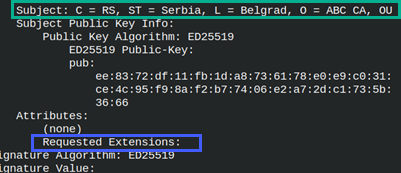 |
We will sign CA certificate using "req" command. We will use extensions from v3_ca section. Note that when we create a certificate with "-x509" option, there will be no new entry in "index.txt, newcerts or serial.txt". There is no need to register CA certificate.
openssl req -new -x509 -config myCA.cnf -key private/myCA.key -extensions v3_ca -out certs/myCA.crt |
When we use "ca" command for signing, only then there will be changes in the "index.txt, serial.txt, newcerts". For selfsigning CA certificate we don't need that. That is why we will use ordinary "req" command. |
We can read from the newly create certificate. openssl x509 -in certs/myCA.crt -noout -textWe can notice one thing. There is no " issuer" for "Authority Key Identifier", we only have "keyID". This is normal because we are using self signed certificate, so there is no need for repetition. Subject and Authority are the same. | 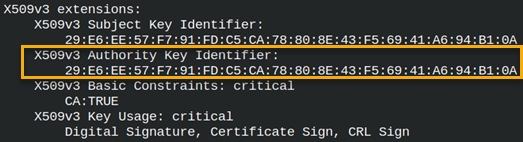 |
openssl verify -CAfile certs/myCA.crt certs/myCA.crt | certs/myCA.crt: OK # We can verify certificate. |
CRL
We can use "ca" command to create CRL file. | openssl ca -config myCA.cnf -gencrl -out crl/myCA.crl |
 | A new file will be created inside of the "crl" folder. This file will look like any other certificate or key, some text and base64 encoding between. Inside of the "crlnumber.txt" file, a number will increase by 1, and will become 2730 + 1 = 2731. |
One new file will appear. This is a copy of "crlnumber.txt" file. It will have the old CRL serial number 2730. | 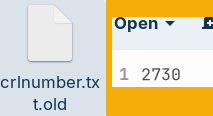 |
We can read from the CRL file. We will see inside that there are no revoked certificates. openssl crl -in crl/myCA.crl -noout -text | 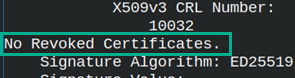 |
We will verify the CRL file. openssl crl -in crl/myCA.crl -CAfile certs/myCA.crt -noout -verify |  |
# scp crl/myCA.crl webserver:/var/www/html/myCA.crl | We must copy the CRL file onto web server for download. |
Certificate Revocation
This is how we revoke the certificate we made. openssl ca -config myCA.cnf -revoke certs/myCA.crt -crl_reason keyCompromise |  |
These are the possible values for "-crl_reason".
| unspecified | keyCompromise | CACompromise | affiliationChanged | superseeded | cessationOfOperation | privilegeWithdrawn |
| No specific reason. | Subject private key is compromised. | CA private key is compromised. | Subject had organizational change. | A new certificate is issued. | Subject is closed. | Usage and constraints of a certificate are changed. |
Revoked certificate will be registered in the "index.txt" file. Letter "R" means that this certificate is Revoked. cat index.txt |
 |
 | The first time we write something into "index.txt" database, the new files could appear. The file "index.txt.old" is backup of the "index.txt" file. In our case it is empty, because there was nothing in the "index.txt" file previously.The file " index.txt.attr" contains the value of the option "unique_subject = no". | 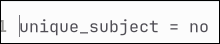 |
Crating a New CA Key and Certificate
| We will again create the CA key and certificate. | openssl genpkey -algorithm ed25519 -out private/myCA.key |
Now that we have a new key, we will create a new CRL file. openssl ca -config myCA.cnf -gencrl -out crl/myCA.crl We can read from this new CRL file. openssl crl -in crl/myCA.crl -noout -text Inside of the CRL file, we will see our certificate revoked. | 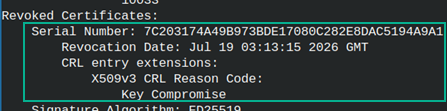 |
We can verify our CRL file. openssl crl -in crl/myCA.crl -CAfile certs/myCA.crt -verify |  |
# scp crl/myCA.crl webserver:/var/www/html/myCA.crl | We must copy the CRL file onto web server for download. |
Because we created CRL file twice, the number in the "crlnumber.txt" file is 2732.