OpenSSL Configuration File Sections Naming Convention
Names of configuration file sections are following established convention, but there is nothing that enforce that convention. We don't have to name our sections "req, req_dn, v3_req". We can name them "req, req_distinguish_name, req_ext". These are just labels for better organization.
| The only time a section name matters is when something references it. | req_extensions = my_ext |
There are a few exceptions. If we want to use configuration file with "openssl -req" command, we should have "[req]" section. For "openssl -ca" command we should prepare "[ca]" section.
Configuration File for Creation of a CSR
When we want to create CSR file, we usually use these three sections:
[req] – major CSR options. | [req_dn] – country, state, city. | [v3_req] – extensions. |
[req] Section
prompt = no | This option means that we will not be asked for Country, State, City. Instead of entering these values through interactive prompt, the values will be taken from configuration file. If we say " prompt = yes", the values from the configuration file will be default values inside of the interactive prompt. |
default_bits = 4096 | The size of RSA key. |
default_md = sha256 | We use this option if we want to specify what hash algorithm should be used. |
default_keyfile = private.key | The default filename for the generated private key. This name will be used if not specified on the CLI. |
encrypt_key = no | Should the private key be encrypted. |
distinguished_name = req_dn req_extensions = v3_req | These are pointers toward sections that contains subject data and extensions. |
utf8 = yes | Forces UTF-8 interpretation of config file input. |
string_mask = utf8only | Character set/encoding used for distinguished name string fields ( Country, State, City ). |
[req_dn] Section
| C | : 2-letter ISO country code | L | : City | OU | : Organization unit | emailAddress | : Contact address |
| ST | : State or Province | O | : Organization | CN | : Domain or a person name |
[v3_req] Section
subjectAltName = DNS:example.com,IP:192.168.1.50 | Domain names and IP addresses that certificate will be used for. |
basicConstraints = CA:FALSE | This option determines whether the certificate will be able to sign other certificates. |
keyUsage = digitalSignature, keyEncipherment | What cryptographic operations the certificate's public key is allowed to perform |
extendedKeyUsage = serverAuth | Extension specifies for what scenarios a key may be used. |
tlsfeature = status_request | This requests the OCSP Must-Staple extension. Not all CAs honor it. |
All the possible values for "keyUsage" are these. They are explained in the article about certificate extensions ( L0090 ).
digitalSignature | contentCommitment | dataEncipherment | keyAgreement | keyEncipherment |
keyCertSign | cRLSign | encipherOnly | decipherOnly |
All the possible values for "extendedKeyUsage" are these. They are explained in the article about certificate extensions ( L0090 ).
serverAuth | clientAuth | codeSigning |
emailProtection | timeStamping | OCSPSigning |
One Real Configuration File for CSR
I will create one configuration file with these options: cd /home/fff/Desktop | [req] default_bits = 4096 default_md = sha256 default_keyfile = private.key encrypt_key = no prompt = no distinguished_name = req_dnreq_extensions = v3_req | [req_dn] C = RS ST = Serbia L = Belgrade O = Corporation OU = Infra Team CN = example.com | [v3_req] basicConstraints = CA:FALSE keyUsage = digitalSignature extendedKeyUsage = serverAuth subjectAltName = DNS:example.com |
| We will create RSA key and CSR using this configuration file. We can read the content of a CSR file. | openssl req -new -newkey rsa -out request.csr -config csr.cnf |  |
– We will not be asked to provide DN data, we will not be asked for a password for the private key.
– The name of a file with a private key will be taken from configuration file.
| We can use the same configuration file to create elliptic curve key and associate CSR file. |
openssl req -new -newkey ec -pkeyopt ec_paramgen_curve:prime256v1 -keyout ECprivate.key -out ECrequest.csr -config csr.cnf |
Configuration File for Creation of a Certificate
This time, a Certificate Authority will sign our CSR file. I don't have a CA private key, so I will again use custom made private key. We will pretend that it was a CA that signed my CSR file.
I will create new configuration file. This file is different because it doesn't have "[v3_req]" section. This configuration file will have "[server_cert]" that is used when a CA sign a leaf certificate. touch cert.cnf | [req] distinguished_name = req_dn prompt = no | [req_dn] | [server_cert] basicConstraints = critical,CA:FALSE |
"[server_cert]" section is for extensions as we can see from its content.
subjectKeyIdentifier = hash | We will get this in a certificate: X509v3 Subject Key Identifier: | This extension is asking for inclusion of SKI in the final certificate. We will use hash in the SKI. |
authorityKeyIdentifier = keyid,issuer | We will get this in certificate: X509v3 Authority Key Identifier:keyid:AB:CD:EF:12:C8:96:47:19:44:19:EC:AB:0C:18:A5:D7:49:58:EF:E0:A1 DirName:/C=US/O=Example CA/CN=Example Root CA | This extension is the same, but for AKI. Here we will use hash and distinguish name. |
Creation of a Certificate
I will create one EC key, and only the key. openssl genpkey -algorithm EC -pkeyopt ec_paramgen_curve:prime256v1 -out server.key |
I will use settings from the configuration file to create CSR file. openssl req -new -key server.key -out server.csr -config cert.cnf |
I will read from the new CSR file. We will see no extensions. Extensions will appear in CSR file only when we have "[v3_req]" section. This time we assume that CA is the one who will define what extensions will be used. That is why we placed extensions in the "[server_cert]" section. openssl req -in server.csr -text -noout | 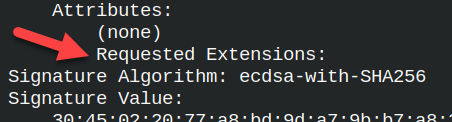 |
I will assume that we are now Certificate authority. We will sign the CSR. In the certificate we will place extensions from the "[server_cert]". |
openssl x509 -req -in server.csr -signkey server.key -days 365 -out server.crt -extfile cert.cnf -extensions server_cert |
Notice that we explicitly had to declare what is our configuration file and from where to pull extensions. When we create a certificate based on the CSR file, the command must be explicit what extensions to use. When the CA sign CSR file, CA must declared what extensions to use from the configuration file.
We will take a look into our certificate. openssl x509 -in server.crt -text -noout Now, we can see the extensions. We have 6 extensions in our configuration file, and we can see all of their values here. | 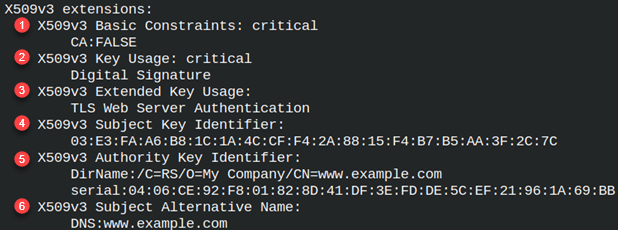 |
Self Creation of a Certificate
There is another way how we can create a certificate. We can create a certificate directly from the private key. This is again a self signed certificate, but we are doing everything in two steps. First, we run a command to create a private key, and then we run a command to create a certificate from that private key. This time we will not create CSR file at all.
This time, CA is not involved, we will consider that "cert.cnf" file is our configuration file.
What is interesting about this command is that we don't have to be explicit. This command knows about "x509_extensions" option. That option will direct this command to "[server_cert]" section. | openssl req -new -x509 -key server.key -config cert.cnf -out server2.crt |
If we read from this certificate, we will see the same extensions as previous. There will be no difference in the certificate. openssl x509 -in server2.crt -text -noout | 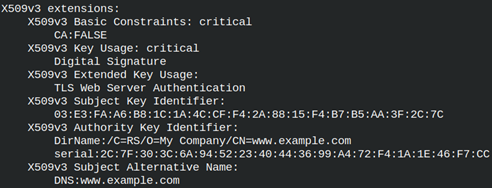 |
Why is OpenSSL API so Convoluted?
You've probably noticed by now that the OpenSSL API is far from easy to use. While it's the most important cryptographic library in existence, OpenSSL certainly has a "cryptic" user interface. Every command looks the same. This is due to:
– the complexity of the problem
– the accumulated decades of compatibility requirements
– the need to introduce new cryptographic technologies and methods
– the limitations of the ecosystem, a library with millions of users cannot be developed as aggressively as a newer project
– OpenSSL provides low-level primitives that support many workflows
– OpenSSL was created by cryptographic experts, but is now used by self-taught hobbyists
This is the same problem that plagues Qt, Git and Python Pandas. They seemingly perform simple functions, but somehow always seem overly complicated. Software entropy is a price for a long-term success.