Let's run this command to find configuration file. openssl version -d
I will jump to this folder "/usr/lib/ssl". Inside of it we will find "openssl.cnf". We can see that this is not a file, but a symlink toward "/etc/ssl/openssl.cnf".
I will open the folder symlink is directed to. The file inside is writable only by the root. cd /etc/ssl
I will open this file, as a read only. I will see there one big configuration file. This is configuration file for OpenSSL. nano /etc/ssl/openssl.cnf
This file is organized as a INI file. It is divided in sections, where the name of the section is between square brackets ( [policy_match] ). Settings are in the form of "key=value". Comments are starting with "#".
This configuration file is used to define default values that OpenSSL will use. This makes the usage of OpenSSL standardized and predictable.
Making of a Configuration File
We will never make changes in the configuration file provided by OpenSSL installation. We will make our own file that contains only those settings that we need. "Openssl.cnf" file is a huge file with many settings, but in reality, only some of them are regularly used.
I will create a file and I will paste this text into that file. For now, you don't have to know what this text means. cd /home/fff/Desktop touch openssl.cnf
After pasting, I will protect this file. sudo chmod 644 openssl.cnf sudo chown root:root openssl.cnf
HOME = . # Unused variable. Dot is current directory. KEY_SIZE = 2048 # Variable .include extensions.cnf # Inclusion of another file [req]# CERTIFICATE REQUEST prompt = no default_bits= $KEY_SIZE# Key size when generating a new key default_md= sha256# Hash algorithm distinguished_name = req_dn# Referring to other section x509_extensions= server_cert# Referring to section in included file [req_dn]# DISTINGUISHED NAME countryName = RS organizationName = Organization commonName = Common Name
Inclusion of Other File
The third line in the configuration file is for including another configuration subfile. Everything we place in this other configuration file will be available inside of the main configuration file. .include extensions.cnf
I will create this subfile. touch extensions.cnf I will add the content to this file, and I will set safety attributes. sudo chmod 644 extensions.cnf sudo chown root:root extensions.cnf
We can use the configuration file we created to create self signed key. openssl req -new -newkey rsa -noenc -x509 -days 365 -config openssl.cnf -keyout private.key -out certificate.crt
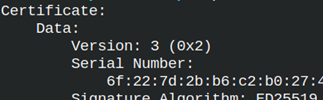
We can read some segments from our certificate. Inside data is taken from the configuration file.
openssl x509 -in certificate.crt -text -noout
Characteristics of a Configuration File
Variables
At the top we can see two variables. We can later refer to these variables like this. We write the dollar sign before the variable name. default_bits = $KEY_SIZE
HOME = . # Unused variable. Dot is current directory. KEY_SIZE = 2048 # Variable
Inclusion of Other File
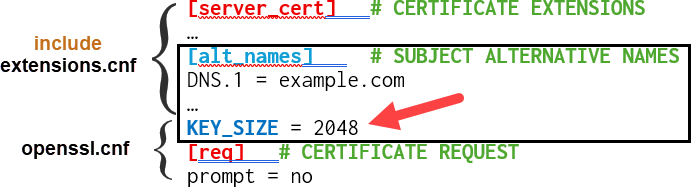
We have already saw how to include another file. Here, I will tell you to include another file only after the variables.
KEY_SIZE = 2048 # Variable .include extensions.cnf # Inclusion of other file
If we reverse the order, subfile will be expanded above variables. Because the section [alt_names] ends when the new section starts, the variable KEY_SIZE will be considered as a part of the [alt_names] section. This will raise an error. This is why it is important to first declare variables.
Usual Sections in "openssl.cnf" File
[req]
Here we place fields that are important for creation of CSR and self signed certificates.
[req_dn]
Fields that explain subject are here ( Country, State, City… ).
[v3_req],[usr_cert],[v3_ca]
This is where we place extensions ( basicConstraints, keyUsage, authorityKeyIdentifier … ).
[ca],[CA_default]
You can be your own CA. For that you use these sections.
[policy_match],[policy_anything]
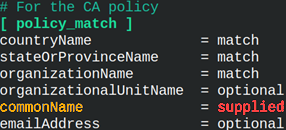
Used when we are CA. It defines how Distinguished Name (DN) fields of certificate and a CSR should match.
Only [req] and [ca] sections are mandatory, and they are the entry points. All other sections are a convenient way to organize our settings.
Multiline Settings
We can turn a long line into a multi-line line by putting a backslash at the end of each line.
For better organization, we can divide some sections into several sections. We can then reference the detailed sections by their name within the main section. The detailed sections can be from an included file.
[req]# CERTIFICATE REQUEST distinguished_name = req_dn# Referring to other section x509_extensions = server_cert# Referring to section in included file [req_dn]# DISTINGUISHED NAME countryName = RS [server_cert]# CERTIFICATE EXTENSIONS; from inluded file basicConstraints = critical,CA:FALSE
Long Lists
Long lists, like this one, can be difficult to read. We can break such list into lines inside of the auxiliary section.
Auxiliary sections are created as any other section, and they can have custom names. When we refer to them, we must use the sign "@" before their name.
Configuration file will never contain private keys, but it can contain sensitive paths or passwords. Sensitive paths can lead to private keys. We should avoid placing delicate data inside of this file.
Location of "openssl.cnf" File
1) OpenSSL will first search for a configuration file on the location written inside of the environment variable "OPENSSL_CONF".
2) We can write the exact location of the configuration file in the command that we use ( -config /home/fff/Desktop/openssl.cnf ).
3) We will use default configuration file that was created during installation ( openssl version -d ).
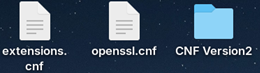
I will create a new folder. I will copy the files "extensions.cnf" and "openssl.cnf" in that folder. We now have 2 versions of these 2 files. We also have official "openssl.cnf" file. We will use them all for testing.
1) IncludeIF ( Official Configuration File )
I will open official configuration file in nano text editor. sudo nano /etc/ssl/openssl.cnf
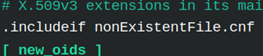
I will add this line into it, below variables. .includeif nonExistentFile.cnf
The purpose of this command is to include another configuration file, but only ifthat file exists. Otherwise, it will be ignored.
I will create certificate using official certification file. I am expecting that no error will be raised. This time, we don't use "-config" option.
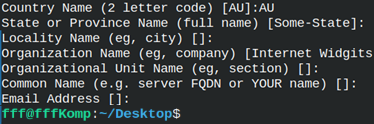
We will be asked to provide subject data, but no error will appear. "IncludeIF" command is ignored.
I will now read the content of my certificate. Inside of it I can see that the default organization is "Internet Widgits Pty Ltd". openssl x509 -in /home/fff/Desktop/certificateOfficial.crt -text -noout
If we read from the official "openssl.cnf" file, we can see where from the organization name comes from. sudo cat /etc/ssl/openssl.cnf | grep Widgits
2) Variables from Other Sections ( Version 1 Files )
Inside of the version 1 "openssl.cnf" file I will make some changes. I will create a new variable inside of the "req" section with a name "newVariable". I will reference that variable in "req_dn" section.
[req]# CERTIFICATE REQUEST newVariable = Ultra Organization# we will add new variable [req_dn] # DISTINGUISHED NAME organizationName = $req::newVariable
I will create new certificate by using Version 1 configuration file. openssl req -new -newkey rsa -noenc -x509 -days 365 -config openssl.cnf -keyout privateNewV.key -out certificateNewV.crt
I will read from this new certificate. We read variable from other section. openssl x509 -in certificateNewV.crt -text -noout | grep Subject
3) Environment Variables ( Version 2 Files )
I will read the content of the USERNAME environment variable.
env | grep USERNAME # USERNAME=fff
We can use this environment variable inside of the "openssl.cnf" file, version 2. I will change the value of "organizationName" into the value of this environ.
organizationName = $ENV::USERNAME
This time I will set "OPENSSL_CONF" environment variable.
I will create new key and certificate. Let's see what version of configuration file will this command use. openssl req -new -newkey rsa -noenc -x509 -days 365 -keyout privateENV.key -out certificateENV.crt
Version 2 of a configuration file is used. This is thanks to "OPENSS_CONF" environ. The value of organization field is the same as USERNAME environ. openssl x509 -in certificateENV.crt -text -noout | grep Subject
We will continue talking about certificate extensions from Reddit. openssl s_client -connect reddit.com:443 </dev/null | openssl x509 -text -noout
Authority Information Access ( AIA )
This extension offers two pieces of information: – On-line register to check certificate validity. – Site to download CA issuer certificate.
Both OCSP and "CA Issuers" are using HTTP ( not HTTPS ). They only contain public data and are signed ( integrity is protected ).
OCSP
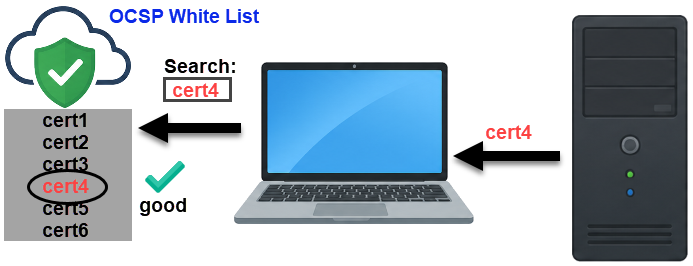
OCSP ( On-line Certificate Status Protocol ) is online white list of valid certificates. When the client receives the certificate, the client will read OCSP web site address from that certificate. The client will send serial number of a certificate and public key hash to that web site, and it will get an answer whether the certificate is valid. The answer can be: good, revoked or unknown.
OCSP vs CRL ( Certificate Revocation List )
OCSP has two major advantages over CRL.
1) The size of CRL file is in MB, OCSP traffic is in KB.
2) OCSP lists are updated more often.
Unfortunately, OCSP has two drawbacks:
1) If OCSP service is down, it is not possible to verify a certificate. In that case, most internet browser will ignore OCSP if it is not available.
2) OCSP is now informed about each web site the client visited. That is a compromise of privacy.
OCSP vs OCSP Stapling
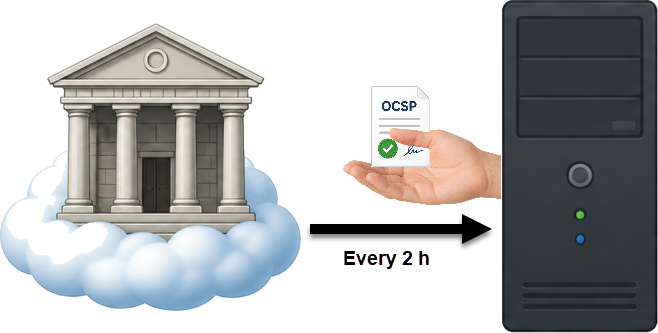
Instead of OCSP, modern browsers use OCSP stapling. This is how OCSP stapling works. Every few hours, the server will download a signed confirmation from a certificate authority that the server's certificate is valid. That confirmation is time stamped and has a limited lifespan. Now the server has proof that its certificate is valid.
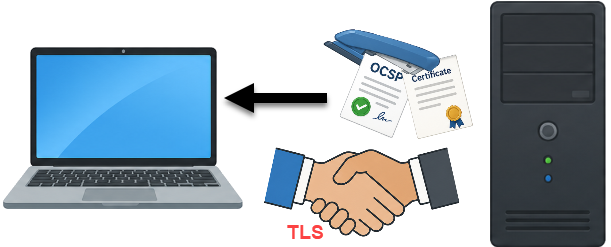
During TLS handshake between the server and client, the server will give the client its certificate, and signed confirmation. We can think of OCSP confirmation stapled to a certificate. Client can now trust the server's certificate.
These are the benefits of OCSP stapling:
1) CA can not monitor what web addresses the client is visiting. The privacy is preserved.
2) Less of internet traffic and less burden on OCSP server.
3) It is not a problem if OCSP stapling service is down. The server can cache OCSP stapling, so everything works until OCSP stapling service is up again.
Modern browsers will try OCSP Stapling, if that fails, they will try OCSP, and as a last resort they will try CRL.
CA Issuers
According to CRT extension, this link certainly contains a certificate.
We will download that certificate with WGET command.
cd /home/fff/Desktop wget http://cacerts.digicert.com/DigiCertGlobalG2TLSRSASHA2562020CA1-1.crt
This is DER certificate. We can read its content.
openssl x509 -in DigiCertGlobalG2TLSRSASHA2562020CA1-1.crt -inform DER -text -noout
Inside of this certificate we will see familiar numbers. Based on them we know that this is intermediate certificate.
To verify a server certificate, a client must have the entire certificate chain, from the root CA certificate to the leaf certificate. However, misconfigured web servers often forget to include intermediate certificates, sending only their own end-entity certificate. In this case, we can use the CA certificate issuer link to follow the certificate chain upstream and complete the entire certificate chain. This is known as AIA Chaining.
How to Use OCSP for Manual Check?
We already know that OCSP link is "http://ocsp.digicert.com". We can get it separately like this: openssl s_client -connect reddit.com:443 </dev/null | openssl x509 -noout -extauthorityInfoAccess
We already have intermediate certificate ( from AIA link ↑ ). I will download the leaf certificate. openssl s_client -connect reddit.com:443 </dev/null | openssl x509 -out LeafCert.crt
Now that we have both certificate ( leaf and intermediate ), and we know OCSP link, we can use ocsp command. openssl ocsp -issuer DigiCertGlobalG2TLSRSASHA2562020CA1-1.crt -cert LeafCert.crt -url http://ocsp.digicert.com
This will be the result. According to OCSP response, our certificate has status good. This answer will be valid for 7 days.
How to Check if CA Supports OCSP Stapling?
We will read Reddit.com certificate. We will use option "-status".
If we get a response that contains this block of data, that means that our CA supports OCSP stapling.
Basic Constraint
For Reddit, this extension is FALSE. That means that this certificate can not be used to validate other certificates. Only certificates of Certification Authorities have this extension set to TRUE.
We can read this extension from intermediate certificate. For DigiCert, this extension is set to TRUE. openssl x509 -in http://cacerts.digicert.com/DigiCertGlobalG2TLSRSASHA2562020CA1-1.crt -noout -extbasicConstraints
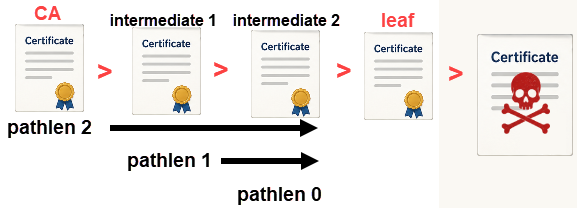
We can also notice that there is "pathlen" property for DigiCert basic constraint. If the value for "pathlen" is 0, that means that below this certificate there can be zero intermediate certificates. This value shows how many intermediate certificates can be below DigiCert certificate.
On the image we can see that this limit makes impossible for someone to prolong certificate chain. Without this setting, anyone would be able to use legitim certificate to sign fake certificates.
This extension is always labeled as "critical". A client must obey this extension. If a client doesn't understand this extension, then it must reject connection with a server.
CT Precertificate SCTs
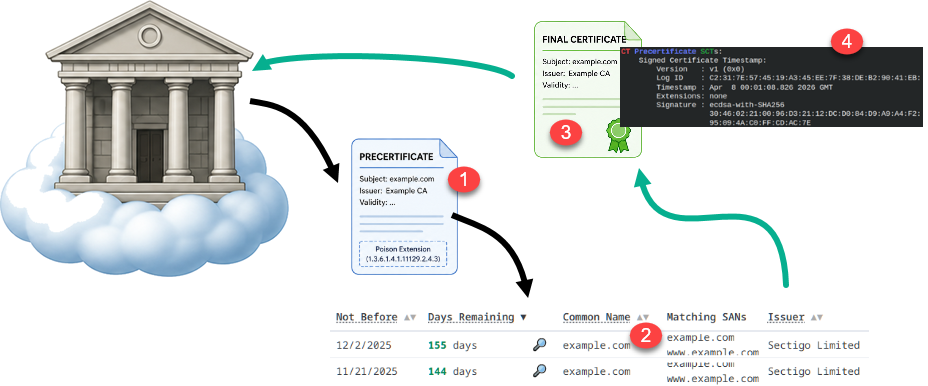
Certificate Authorities can be hacked or they can make a mistake. CAs can be coerced by the local government. This can lead to CA creating fake certificates for important web sites. For example, a new certificate can be created for a fraudulent bank web site. When a client access that web site, a client will not know that it is a rogue web site. That web site can now steal the client's password.
Solution is to monitor creation of the new certificates. These days every new certificate must be registered on online lists that are known as "Certificate Transparency logs". CA will create uncomplete certificate "Precertificate" (1). The precertificate will be send to CT (2). CT will create final certificate (3). Final certificate will have "CTPrecertificateSCTs" (4) extension. Thanks to that extension, certificate now has a proof that it is registered in CT logs. Now it is possible to check whether someone issued an illegal certificate for the web site we own. This is done by searching for our organization name on CT logs.
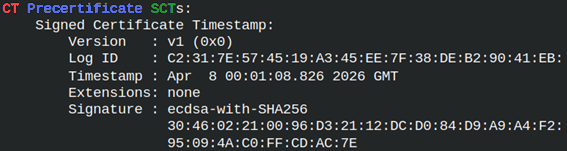
SCT is "Signed Certificate Timestamp". SCT is signed promise that CT received a precertificate and will add it to its list. SCT registries are append-only. After the certificate is in the CT logs, it will never be deleted.
Structure of SCT
All SCTs are version 1. This is version of SCT specification.
Version: v1 (0x0)
SHA-256 hash identifying which specific CT log issued this receipt
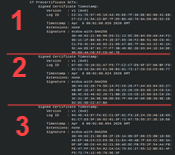
Modern certificates must have at least two or three SCTs, so that browser would trust them. certificate < 180 days2 SCTs 180 days < certificate < 15 months 3 SCTs 15 months < certificatemore than 3
CT logs are operated by different independent organizations (Google, Cloudflare, DigiCert, Sectigo, and others each run logs).
We can isolate and read SCTs with the option "ct_precert_scts". openssl s_client -connect reddit.com:443 </dev/null | openssl x509 -noout -extct_precert_scts
CT logs
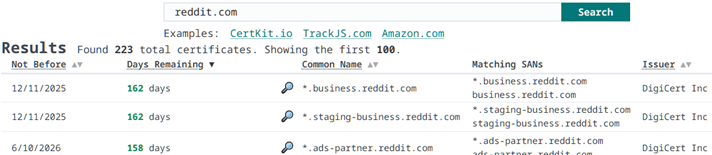
I will give you two web sites where you can search through SCTs.
On these web sites you can type the name of your domain and you will get a list of all of the certificates that are issued for that domain.
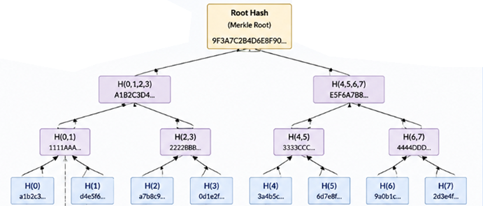
SCTs are stored in so called "Merkle tree". Each pair of SCTs is hashed, and then results are hashed, until we get a root hash. All SCTs are connected in one big hierarchy. That makes impossible for someone to tamper with SCTs.
Merkle tree is technology that is internally used by blockchain.
Other Extensions
Reddit has the most used and important certificate extensions. There are many more possible extensions, which are usually specialized.
Freshest CRL:
    URI:http://ca.example.com/delta.crl
Because CRL files have size too big, it is possible to download them incrementally. In that case we only download delta CRL that contains only changes since the last full CRL.
X509v3 Subject Information Access:
   CA Repository - URI:ldap://ldap.example.com/cn=ExampleCA
This is opposite to AIA. AIA is about CA. SIA is about the certificate owner.
S/MIME Capabilities:
    AES-256-CBC
    AES-192-CBC
This email server supports next symmetric encryption algorithms.
Adding Extensions to CSR File
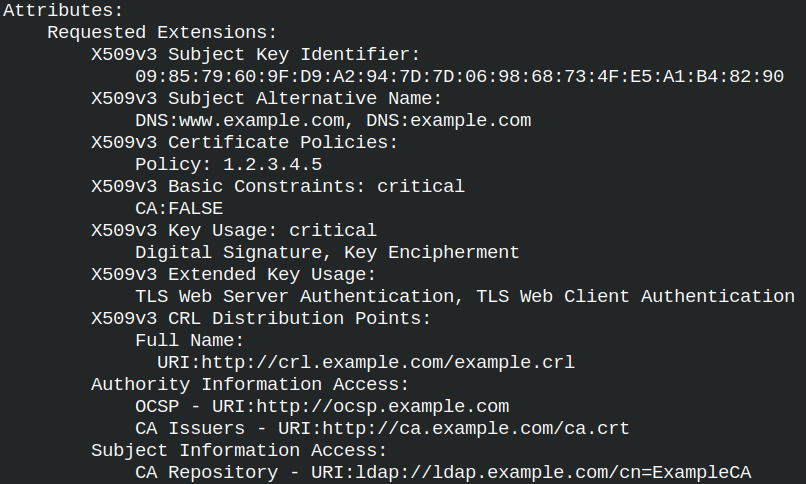
Now that we are familiar with the various extensions, let's look at how to add them to a CSR file. Some extensions are added to CSR files, but not all of them. The "authorityKeyIdentifier" and "ct_precert_scts" extensions contain data provided by the Certificate Authority (CA). We will not add these extensions ourselves; the Certificate Authority will do so. Here is the statement for key creation and CSR statement.
When we read a certificate, we can see the version of the certificate specification at the top. Currently all certificates are using the version No. 3. Each new version had some new features. To avoid creating a new version every time a new feature is needed, extensions are introduced. When we want to add a new feature, we just add a new extension, we don't have to change certificate specification.
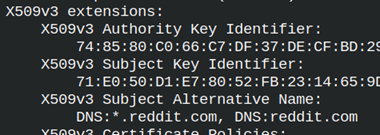
We will take a look at Reddit certificate. In the section "x509v3 extensions", we can find many extensions and their values. We will look at them one by one. openssl s_client -connect reddit.com:443 </dev/null | openssl x509 -text -noout
Reddit Certificate Extensions
Authority Key Identifier and Subject Key Identifier
Reddit certificate is signed by DigiCert CA. DigiCert has its public key. SHA1 hash of that public key is calculated and we can see it here in this field.
Subject key identifier is SHA1 hash of the Reddit public key.
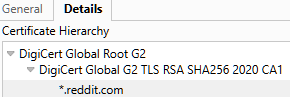
The purpose of these fields is to identify certificates that make a chain. If we take a look at Reddit certificate chain, we will see three certificates. The first two belongs to DigiCert root and intermediate certificates.
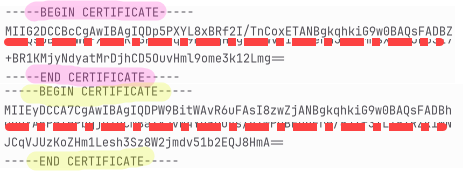
We can use "-showcerts" to export the certificate chain to a file. Inside of that file, we will find intermediate and leaf certificate. Root certificate is in the folder with other root certificates that our OS trust "/etc/ssl/certs".
I will copy these two certificates into two separate files with names "Digicert1.cert" and "Digicert2.cert". Then we can read the content of these files. I am only interested into AKI and SKI fields. cd /home/fff/Desktop openssl x509 -in DigiCert1.crt -text -noout openssl x509 -in DigiCert2.crt -text -noout
DigiCert1 is a leaf certificate.
DigiCert2 is intermediate certificate.
Notice that leaf AIK is the same as intermediate SKI.
Now, we only miss connection between root and intermediate certificate.
I will find the root certificate in my Linux OS certificate store. cd /etc/ssl/certs ls | grep DigiCert_Global_Root_G2.pem
I will read AKI and SKI from the root certificate. openssl x509 -in DigiCert_Global_Root_G2.pem -text -noout This is self-signed certificate, so there is no AKI, only SKI.
Root certificate SKI is the same as AKI for intermediate certificate.
Now we can reconstruct the whole certificate chain.
Reading of AKI and SKI
We can read only AKI and SKIextensions, not the whole certificate. openssl s_client -connect reddit.com:443 </dev/null | openssl x509 -noout -extauthorityKeyIdentifier,subjectKeyIdentifier
Subject Alternative Name
When we connect to some web site and we download that site certificate, inside of that certificate we must find the URL of that site. That is how clients verify certificates.
We can verify that certificate is valid for our web site with this OpenSSL command. openssl s_client -connect www.reddit.com:443 -verify_hostname www.reddit.com
Todays web browsers are only checking this SAN field. They are never verifying CN field.
I will remind you that for URL we can use domain, wildcard domain and multidomain.
example.com – valid only for that URL.
*.example.com – valid for the first level subdomains. It will match any address like "users.example.com" or "info.example.com". It will not match two or more levels subdomains like "info.users.example.com".
DNS:example.com, DNS:google.com – now we can use the same certificate for multi domains.
DNS:example.com, DNS:*.example.com, DNS:*.*.example.com – we can set our certificate to be valid for multidomans, wildcard domains with different subdomain levels, so any combination is possible.
SAN is not only for web sites addresses. We can also use: email: URI: RID: otherName: RID is "registered object identifier". "otherName" is for custom identifiers.
X509v3 Subject Alternative Name:
       email:admin@example.com,
       URI:https://example.com/service
We can read only the SAN field, with option "subjectAltName". openssl s_client -connect reddit.com:443 </dev/null | openssl x509 -noout -extsubjectAltName
Certificate Policies
Here, we can see web page with CPS ( Certification Practice Statement ). There we can find legal/technical PDFs published by the CA that describes in detail how they protect private keys, how they verify identities, what is procedure for revocation.
This certificate was issued according to policy 2.23.140.1.2.2. This is not CA's policy. This is official policy issued by the "CA/Browser Forum". This organization have members that are major stakeholders in the PKI infrastructure. It includes CAs, web browser vendors, OS creators, email server providers and others.
These policies mostly explain how thoroughly the identity of the certificate owner was vetted before issuance. We already talked about OV, DV, IV, EV certificates. These policies refer to these different kinds of verification. Some of the most popular policies are:
2.23.140.1.2.2
2.23.140.1.2.1
2.23.140.1.2.3
2.23.140.1.1
2.23.140.1.4.1
Organization Validated
Domain Validated
Individual Validation
Extended Validation
Code Signing
We can extract certificate policies from a certificate with this option. openssl s_client -connect reddit.com:443 </dev/null | openssl x509 -noout -extcertificatePolicies
Key Usage
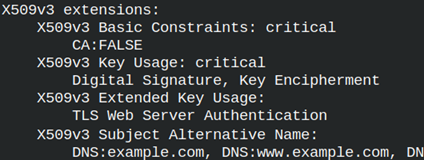
The Key Usage extension specifies what cryptographic operations the certificate's public key is allowed to perform. Our key can only be used for signing. This extension is marked as "critical". If a client doesn't understand this "critical" extension, it should reject the certificate with this extension.
"Key Encipherment" means that the key can be used for signing other keys. This is only important and useful for RSA keys.
There are many different usages that we can provide in this extension:
Digital Signature
For signing certificates, code, files.
Content Commitment
Signing can not be later denied. For legal documents.
Data Encipherment
For signing data directly. Rarely used.
Key Agreement
The key can participate in key agreement protocols ( DH of ECDH ).
Certificate Sign
Can sign certificates.
CRLSign
Can sign certificate black lists.
Encipher Only
Only for encryption.
Decipher Only
Only for decryption.
Key usage options are usually used in these combinations.
Signatures → Digital Signature, Content Commitment
Encryption → Key Encipherment, Data Encipherment
Key exchange → Key Agreement, Encipher Only, Decipher Only
CA operations → Certificate Sign, CRL Sign
We will only read key usage option from a certificate. openssl s_client -connect reddit.com:443 </dev/null | openssl x509 -noout -extkeyUsage
Extended Key Usage
The Extended Key Usage extension specifies forwhat scenarios a key may be used. Our key can only be used to authenticate a TLS/HTTPS server.
These are possible application scenarios that we can use the key for.
TLS Web Server Authentication
For server authentication.
TLS Web Client Authentication
For client authentication.
Code Signing
For signing code.
E-mail Protection
For email certificates.
Time Stamping
Server that proves the time of signing.
OCSP Signing
For signing certificate white lists.
We can read only the data about extended key usage. openssl s_client -connect reddit.com:443 </dev/null | openssl x509 -noout -extextendedKeyUsage
CRL Distribution Points
Sometimes certificates get revoked. That can happen because the private key is compromised or domain ownership changed. The problem is how to inform a client that some certificate is no more valid. This can be done with certificate revocation lists.
This extension will give us URL through which we can download a list of revoked certificates. This list is refreshed by the CA every few hours. We should not trust the certificates that are on this list.
There will be usually two URLs for redundancy. The URLs do not use HTTPS, but HTTP because their content is public, and it is signed by a CA so that no one can compromise the integrity of such a list. Let's learn a little bit more about certificate revocation lists ( CRL ).
How to Get onto Revocation List?
When you feel that something is wrong with your certificate, you can contact your CA and declare that your certificate should be revoked. Another possibility is that the CA revokes your certificate if there is evidence that some suspicious activity is being performed with that certificate.
Sometimes it is a good idea to purchase a certificate and then immediately try to revoke it. It is possible that the CA does not offer certificate revocation. It is also possible that the clients we use cannot read CRL services or are misconfigured. We want to test that.
Some modern environments don't use CRLs because the downloaded file is big in megabytes, and because the list is refreshed every few hours, the data in these lists is stale. Today, we have a better technology, OCSP, which we will discuss later.
How to Download CRL List?
CRLs are typically downloaded every few hours and then cached. I will download CRL file using URL from Reddit certificate. wget http://crl3.digicert.com/DigiCertGlobalG2TLSRSASHA2562020CA1-1.crl
I will get a file with this name. The file size is 9.7 MB. DigiCertGlobalG2TLSRSASHA2562020CA1-1.crl
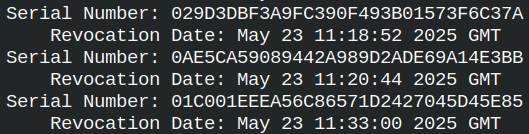
We can read this file with "crl" command. This is usually a binary file with DER format. Because this file is long, I will read only the first 100 lines. Most lines will be serial numbers of a certificates. openssl crl -in DigiCertGlobalG2TLSRSASHA2562020CA1-1.crl -inform DER -text -noout | head -100
If we look for Reddit certificate serial number, we will not find it inside of this list, so that certificate is not revoked. openssl crl -in DigiCertGlobalG2TLSRSASHA2562020CA1-1.crl -inform DER -text -noout | grep "0e:9e:4f:5d:82:fc:c4:14:5f:d8:8f:d3:9c:2a:31:11"
Getting Only the CRL Extension
With option "crlDistributionPoints", we can separately read only the CRL list addresses. openssl s_client -connect reddit.com:443 </dev/null | openssl x509 -noout -extcrlDistributionPoints
Secret keys (RSA, EC, AES) are just big numbers. Any number can be represented in binary as a string of ones and zeros. For example, the number 199 can be represented as "11000111". For historical reasons, we don't want to store and share our keys as binary numbers.
Many historical technologies were built only for text exchange. Such as email, text editors, terminals. Some technologies can work with binary data, but are better suited for text (such as XML and JSON). This is why we want to store our private and public keys as text.
For better compatibility, we want to limit ourselves to only those letters and other characters that are universally understood. Base64 uses an alphabet of only 64 characters ("A-Z, a-z, 0-9, +, /"). If we do not practice text simplicity with a limited number of characters, we risk our keys becoming corrupted and invalid during manipulation.
Base64 works by simple substitution, so number 199199199, which is "11000111 11000111 11000111" in binary format, can be represented as "x8fH" in base64 encoding. That is why the keys look like a sequence of random alphanumeric characters. Each character represents 6 binary numbers, so our key will be shorter.
000000
000001
000010
011010
011011
011100
110100
111101
111110
111111
110001
111100
011111
000111
A
B
C
a
b
c
0
9
+
/
x
8
f
H
PEM Format
When we create a new key, it will be in base64 format. cd /home/fff/Desktop openssl genpkey -algorithm ed25519 -out private.key
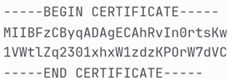
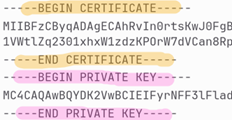
We can easily send and copy this key. Inside of the file, we also have text that is telling where is the start and end of our key. If we see such file, the file is in the PEM format ( Privacy-enhanced Mail ). This is the most used format for storing and sending cryptographic files.
DER Format
DER file format is a binary format. We can easily transform PEM file into DER file in 2 steps: – First we remove "BEGIN/END PRIVATE KEY" text. – Then we decode base64 into zeros and ones.
DER ( "Distinguished Encoding Rules" ) is much more than pure binary format. While keys are just big numbers, certificates contain text, dates, fields and structure. Certificates are also base64 encoded, while in PEM format. To get a readable format, we must base64 decode them into binary format and then to encode them again into English language format.
Mapping between binary format and English language must be deterministic and precise. That is why DER format is important. This format tells us how fields are encoded, how strings/dates are encoded, how the structure is encoded. There is no place for ambiguity and obscurity.
DER file format is used by software, it is not for humans. For software DER files are smaller and easier than PEM files.
PKCS#12 Format
PKCS#12 is a standardized file format for storing and transporting cryptographic material in a single file. This file can contain a private key and the whole chain of certificates. It is cumbersome to manage a key and all of the certificates separately. It is much more convenient to pack everything into one "suitcase". That makes importing, distributing, backing up, much more convenient.
PKCS#12 files are usually encrypted. Encryption protects the content and integrity of a file.
PKCS#12 files are used by organizations to provide authentication of the users. Users add those files into browsers, email clients, smart cards. Windows heavily uses PKCS#12. Some servers, like Microsoft IIS, prefer cryptography files in PKCS#12 format. Mobile device management (MDM) systems distribute client certificates to phones and tablets as ".p12" files.
PKCS#12 files contain keys and certificates in DER format. All of them are encrypted together for safety and convenience. The full name of this format is "Public-Key Cryptography Standards #12".
File Format Extensions
.pem
Files with this extension can store private keys or certificates. They are in the PEM format.
.key
Extension KEY is used for private keys. This extension is used no matter if the keys are in PEM or DER format.
.crt
Certificates in PEM format are saved in files with CRT extension.
.cer
Certificates in DER format are saved in files with CER file extension.
.pfx
This file format extension is used for PKCS#12 files. These files can contain keys and certificates together, or separately.
.p12
Same as above. ".pfx" and ".p12" are the same binary format.
.pub
Is used for public keys in PEM format.
.csr
Is used for certificate signing requests in PEM format.
File format extensions are not important for OpenSSL. For OpenSSL is important that content of a file is correctly formatted. We can name our files anyway we want if we work with OpenSSL, but some other programs can be picky.
We said that PKCS#12 standard files are always in binary format. Contrary to that, PKCS#8 and PKCS#10 files are in the PEM format. When we see a key file presented as PEM, internally it is following PKCS#8 standard. Similar to that, ".csr" files are following PKCS#10 standard.
Veryfication of a Key
I will create one more private key. It will be in the DER format.
openssl genpkey -algorithm ed25519 -outform DER -out privateDER.key
We can check keys in any format with the option "-check". openssl pkey -in private.key -check
For DER keys we will use: openssl pkey -in privateDER.key -inform DER -check
Format Conversions
Key Format Conversions
PEM to DER
We have PEM key. Let's convert it into DER format. openssl pkey -inform PEM -in private.key -outform DER -out privateDER2.key
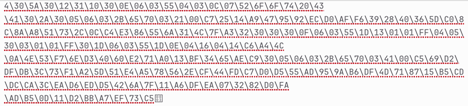
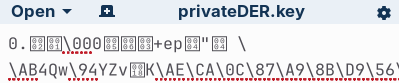
This is binary format DER.
DER to PEM
We can transform our key back to its original format PEM. openssl pkey -inform DER -in privateDER2.key -outform PEM -out privatePEM.key
PEM to PKCS#12
We can place PEM key into P12 container. We must provide a password for PKCS#12 container. openssl pkcs12 -inkey privatePEM.key -export -nocerts -out P12key.p12 -passout pass:1234
This is how we can read P12 key. openssl pkcs12 -noenc -info -in P12key.p12 -passin pass:1234
DER to PKCS#12
It is not possible to directly transform a DER key into PKCS#12. We can do this by using the PEM format as an intermediary.
Certificate Conversion
Certificate Creation
We already now how to create a certificate. Certificate is made by signing CSR file with a private key.
This is how we can transform PEM certificate into DER certificate. openssl x509 -inform PEM -in RootCert.crt -outform DER -out RootCertDER.crt
We can read DER certificates with x509 command. openssl x509 -in RootCertDER.crt -inform der -text -noout
DER to PEM
We can transform DER format into PEM format, of a certificate. openssl x509 -inform DER -in RootCertDER.crt -outform PEM -out RootCertPEM.crt
PEM to PKCS#12
We use option "-nokeys" to export PKCS#12 certificate from PEM certificate. We must provide a password. openssl pkcs12 -in RootCertPEM.crt -export -nokeys -out RootCert.p12 -passout pass:1234
If we provide a certificate and a key, we can export them both into PKCS#12 format. openssl pkcs12 -in RootCertPEM.crt -inkey privatePEM.key -export -out KeyPlusCert.p12 -passout pass:1234
We are working with a self signed certificate. If we had CA signed certificate, then we can add CA certificate inside of the PKCS#12 file too. For that we use "-certfile ca.crt" option. # openssl pkcs12 -in RootCertPEM.crt -inkey privatePEM.key -export -out KeyPlusCert.p12 -passout pass:1234 -certfile ca.crt
We can export only the key. I will use "-nocerts" to exclude certificates. openssl pkcs12 -inkey privatePEM.key -export -nocerts -out NocertsP12key.p12 -passout pass:1234
PKCS#12 to PEM
These commands will convert PKCS#12 files back into PEM format. openssl pkcs12 -in RootCert.p12 -nokeys -out NoKeysRootCertPEM.crt -passin pass:1234 # get certificate openssl pkcs12 -in KeyPlusCert.p12-nokeys -out OnlyRootCertPEM.crt -passin pass:1234 # get only the certificate, without the key
When exporting the key, we will be asked for a password to unencrypt the key. Our key is unencrypted, so I will use "-noenc" to avoid the question. openssl pkcs12 -in KeyPlusCert.p12 -nocerts-noenc -out NoCertsprivatePEM.key -passin pass:1234# get only the key, without certificate
It is possible to export both the key end the certificate. The exported file will have both the certificate and the private key.
It is not possible to convert directly between PKCS#12 and DER files. We can do the conversion indirectly using a PEM file as an intermediary.
PKCS#12 and Certificate Chain
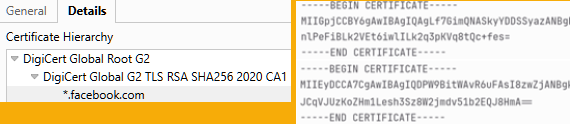
We will download certificate chain from the website www.facebook.com. We will not get root certificate ( it is already on our computer ), but we will get leaf and intermediate certificate. openssl s_client -connect www.facebook.com:443 -showcerts </dev/null > facebook-chain.pem
We will create PKCS#12 file that has the whole certificate chain. openssl pkcs12 -in facebook-chain.pem -export -nokeys -out facebook-chain.p12 -passout pass:1234
Now we will transform this chain back. We can get both certificates, only leaf certificate, or only intermediate certificates.
This command will return the whole certificate chain. It will include both the leaf and intermediate certificate. openssl pkcs12 -in facebook-chain.p12 -nokeys -out facebook-chain2.pem -passin pass:1234
This command should return the leaf certificate. OpenSSL will return the blank file. OpenSSL can not recognize what certificate is leaf certificate. To assert that, OpenSSL must know the private key. The certificate that matches the private key is leaf certificate. Because we do not have the private key, we will get a blank file. openssl pkcs12 -in facebook-chain.p12 -clcerts -nokeys -out facebook-leaf.crt -passin pass:1234# get leaf ( client ) certificate
If OpenSSL can not recognize the leaf certificate, then all of the certificates will be considered intermediate. That is why this command will return both certificates, although we asked only for intermediate certificate. openssl pkcs12 -in facebook-chain.p12 -cacerts-nokeys -out facebook-intermediates.crt -passin pass:1234 # get intermediate certificates
How to Recognize Cryptography File Format?
We made 3 certificate files.
RootCertPEM.crt
RootCertDER.crt
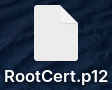
RootCert.p12
To test their format, we must try to open them.
openssl x509 -in RootCertPEM.crt
If this succeeds, this is a PEM file.
openssl x509 -in RootCertDER.crt -inform DER
This would be DER file.
openssl pkcs12 -in RootCert.p12
This will show us that we have PKCS#12 file. Password is "1234".
A certificate chain is a sequence of digital certificates where each certificate is signed by the previous certificate in the chain. That allows a client to verify that a server's certificate is trustworthy, by tracing it back to a root CA.
This structure doesn't have to be linear, it can have a shape of a tree.
Creation of a Certification Chain
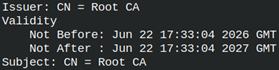
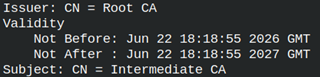
We will make our own certificate chain. We will create three certificates, just like on the image above.
Root Certificate
I will create root private key. This is RSA private key.
cd /home/fff/Desktop
openssl genpkey -algorithm RSA -pkeyopt rsa_keygen_bits:2048 -out RootCA.key
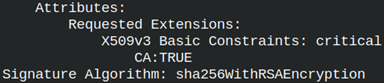
We will use the CA private key to generate CSR file. We will add one extension. Extensions are those special elements in a certificate. The name of extension is "basicConstraints". Here we say whether the private key can be used to sign other keys. For root and intermediate certificates, we must set this setting to true ( CA:TRUE ). For leaf certificates it will be FALSE. critical – this is severity of our setting. Possible values are critical and non-critical. Default is non-critical. If the setting is critical then a client must obey that setting. If a client doesn't understand the critical setting, then it must reject connection. For "basicConstraints" extension we must always use critical.
CA will sign its own public key. "RootCSR.csr" will be signed by "RootCA.key". The result is certificate "RootCert.crt". openssl x509 -req -in RootCSR.csr-copy_extensions copyall-key RootCA.key -days 365 -out RootCert.crt
openssl x509 -in RootCert.crt -noout -text Issuer and Subject of the self signed certificate are the same. Validity of this certificate is 365 days.
By default, extensions will not be copied from the CSR file to the certificate. We need to use the option "-copy_extensions copyall" to make that happen.
Intermediate Certificate
We will create elliptic private key for intermediate certificate.
The next step is to sign CSR file. For signing process we must provide both root private key and root certificate. Private key is used for encryption, but certificate is used for information. Data about root CA will be copied from root CA certificate into intermediate certificate.
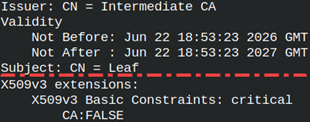
The leaf certificate is issued by "Intermediate CA". "basicConstraint" is set to FALSE. openssl x509 -in LeafCert.crt -noout -text
As a result, we ended up with 9 files. The CSR files can be deleted, but we will still have 6 other files. Key proliferation is something we need to take seriously. In large organizations, the number of keys can grow dramatically, and this requires meticulous key management.
Certificate Verification
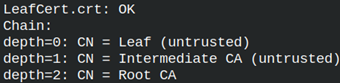
This is how we can verify certificate chain. We have trust in the root certificate, but not into intermediate certificate. Because, this is a chain of certificates, we only need one certificate we trust.
We can also use option "-CAfile" to designate the root certificate. openssl verify -show_chain -CAfile RootCert.crt -untrusted Intermediate.crt LeafCert.crt
We would get the same result.
Certification Chain with Long Commands
Root CA
We can run this long command to get self signed root certificate.
We will test chain of certificates with an OpenSSL server. We will start the server, and we will provide private key and certificate of the leaf. We must also provide an intermediate certificate.
The client is waiting to communicate with the server using the root certificate. The client only needs that certificate to authenticate the server. The server needs to prove its identity, and to do that, it needs to complete the entire chain. That's why the server has both a leaf and an intermediate certificate. The server will send both certificates to the client. The client will then have all three chained certificates. The client trusts the root CA certificate, and because of that, it will trust the intermediate and leaf certificates. That's how a certificate chain works.
Client and server can now have their protected conversation.
Why do We Need Certificate Chains?
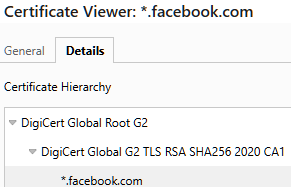
If we look at the certificate chain for the Facebook website, we see at the top the DigiCert certificate. Below that is the intermediate certificate, also from DigiCert. At the bottom is Facebook.
The purpose of certificate chains is to reduce the risk of a CA's private key being compromised. The CA will use its private key to sign a number of intermediate keys. These intermediate keys will be used to sign user certificates. The root key will be hidden, where no one can find or access it. No one will be able to steal the root private key, but the CA will still be able to sign user certificates normally.
If the intermediate private key is compromised, it will only affect some users and will not destroy the CA's business. Certificate chains are a solution for CAs to protect themselves and their users.
Where Does Root Certificates Come From?
When we browse the Internet, we use TLS. When we download some programs to our computer, the program installation files are signed using asymmetric keys. The question is how we can trust web sites and downloaded files if we have never downloaded a certificate from a certification authority.
The answer is that these CA certificates are already on our computer. Trusted root certificates are already determined by the platform creator. A platform can be an operating system, a web server, a VPN server. When we install Ubuntu, we will get all the root certificates that Ubuntu trusts. When we install a web browser, that web browser will have many certificates in it. When we trust some servers or some websites, it is because Ubuntu and Chrome already have pre-installed certificates that provide trust to those servers/sites.
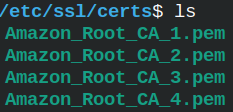
Ubuntu has its certificate store on this location: /etc/ssl/certs
Inside of this folder we can see many certificates in PEM file format.
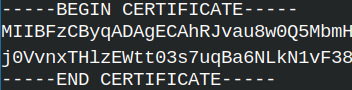
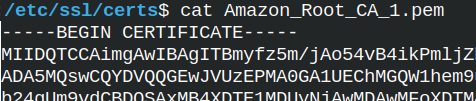
Content of one PEM file.
I have Brave browser installed. Its certificates are at the location "~/.local/share/pki/nssdb".
When we connect to some server, the server will send us certificate chain ( without the root certificate ). We will then search our local certificate store to find CA certificate that is valid for that certificate chain. Because we trust CA certificates from the local repository, then we will able to trust other certificates in the certificate chain.
































 This is binary format DER.