Store Certificate Chains
For convenience we will create certificate chains contained in one file.
Intermediate + CA Certificate
For certificate chain verification it is convenient to store Intermediate and CA certificates in one file, in that order. We will create a new folder for storing this chain. This folder "ipublic" will be inside of the intermediate CA folder "iCA".
cd /home/fff/Desktop | mkdir ./iCA/ipublic | cat ./iCA/icerts/iCA.crt ./myCA/certs/myCA.crt > ./iCA/ipublic/CA-chain.crt |
| Now it is easy to verify leaf certificates: | openssl verify -CAfile ./iCA/ipublic/CA-chain.crt ./server/scerts/server.crt openssl verify -CAfile ./iCA/ipublic/CA-chain.crt ./person/pcerts/pera.crt openssl verify -CAfile ./iCA/ipublic/CA-chain.crt ./client/ccerts/client.crt |
Server, Person, Client Certificate Chain
During TLS handshake, the server will send the whole certificate chain except the root certificate. It is convenient to store these chains in "cert" folders. Each leaf subject has such folder ( "scerts, pcerts, ccerts" ). | cat ./server/scerts/server.crt ./iCA/icerts/iCA.crt > ./server/scerts/server-chain.crt cat ./person/pcerts/pera.crt ./iCA/icerts/iCA.crt > ./person/pcerts/person-chain.crt cat ./server/scerts/server.crt ./iCA/icerts/iCA.crt > ./client/ccerts/client-chain.crt |
Revoking the Leaf Certificate
The leaf certificates are revoked by using Intermediate CA CRL. In the "iindex.txt" file we currently have three issued certificates. |  We issued certificates for the server, person and web client. |
I will revoke person's certificate.cd iCA | openssl ca -config iCA.cnf -revoke ../person/pcerts/pera.crt -crl_reason keyCompromise  |
In the "iindex.txt" file, person's certificate is labeled with "R". |  |
We will create new CRl file. We will place it into "icrl" folder. | openssl ca -config iCA.cnf -gencrl -out ./icrl/iCA.crl |
We can read from this CRL file. Inside of it we will see that the certificate with the serial number 5011 is revoked.openssl crl -in ./icrl/iCA.crl -noout -text | 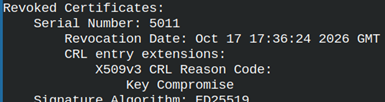 |
# scp ./icrl/iCA.crl webserver:/var/www/html/iCA.crl | CRL file must be copied to web server. |
Verify CRL
There are two ways to verify the CRL. We can check only the leaf certificate revocation status, or we can check both leaf and intermediate revocation status.
Only the Leaf Level
| We will verify this CRL file. | openssl crl -in ./icrl/iCA.crl -CAfile ./icerts/iCA.crt -noout -verify #verifyOK |
We can verify that person's certificate is revoked. We will geta a message "error ../person/pcerts/pera.crt: verification failed". |
openssl verify -CAfile ../myCA/certs/myCA.crt -untrusted ./icerts/iCA.crt -CRLfile ./icrl/iCA.crl -crl_check ../person/pcerts/pera.crt |
Both Intermediate and Leaf Level
| First, we will create a CRL bundle. | cat ./icrl/iCA.crl ../myCA/crl/myCA.crl > ../all.crl |
| We will use CRL bundle to verify person's certificate against both Intermediate and Root CRL file. |
openssl verify -CAfile ../myCA/certs/myCA.crt -untrusted ./icerts/iCA.crt -CRLfile ../all.crl -crl_check_all ../person/pcerts/pera.crt #failed |
OCSP for Leaf Certificates
OCSP responses must be signed by the intermediate CA. For OCSP we must create a directory system, just like we have created for server, person and web client. This directory system will be inside of the "/iCA/iOCSP" folder. | mkdir iocsp cd iocsp | mkdir oprivate mkdir ocsr mkdir ocerts touch iocsp.cnf | 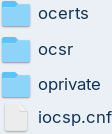 |
| Inside of the configuration file we will place these sections. | [req] default_md = sha256 prompt = nodistinguished_name = ocsp_dn req_extensions = ocsp_req_ext | [ocsp_dn] C = RS O = iCA organization CN = Intermediate OCSP Responder | [ocsp_req_ext] keyUsage = critical, digitalSignature extendedKeyUsage = critical, OCSPSigning |
Private Key and Certificate for OCSP
| I will create a private key for OCSP. | openssl genpkey -algorithm ed25519 -out ./oprivate/iocsp.key | |
| Using the key, I will create CSR file. | openssl req -new -config iocsp.cnf -key ./oprivate/iocsp.key -out ./ocsr/iocsp.csr | |
Inside of the "iCA.cnf" configuration file, we already have extensions for the OCSP responder. We will use these extensions to create a certificate.Before signing the certificate we will jump to " iCA" root folder. cd .. | [v3_ocsp_responder] |
openssl ca -config iCA.cnf -extensions v3_ocsp_responder -in ./iocsp/ocsr/iocsp.csr -out ./iocsp/ocerts/iocsp.crt -days 30 -notext
A new line will appear in "iindex.txt". |  |
We can verify this new certificate. openssl verify -CAfile ./ipublic/CA-chain.crt -purpose ocsphelper ./iocsp/ocerts/iocsp.crt |  |
OpenSSL OCSP Command
OpenSSL can create a simple OCSP responder. This responder is not suitable for production. It should be only use for demonstration and testing. We will use OCSP command to show how OCSP works.
In the "iCA" configuration file, we can find that address for the OCSP service is "http://ocsp.example.com:7000". Our educational OCSP responder will not use this address, but will use a localhost. | [issuer_info] caIssuers;URI.0 = http://ica.example.com/ica.crtOCSP;URI.0 = http://ocsp.example.com:7000 |
I will start the responder on the port 7000. Responses from this responder will be valid for one day. This responder will read from the "iindex.txt" file to see which certificates are valid and which are revoked. |
openssl ocsp -index iindex.txt -port 7000 -CA ./icerts/iCA.crt -rsigner ./iocsp/ocerts/iocsp.crt -rkey ./iocsp/oprivate/iocsp.key -ndays 1 -text |
 |
Testing a Valid Certificate
First, we will test a valid certificate. We will open another terminal tab and there we will change working folder to "/home/fff/Desktop/iCA".
cd /home/fff/Desktop/iCAThis will be test to see if the " server" certificate is valid. |
openssl ocsp -issuer ./icerts/iCA.crt -cert ../server/scerts/server.crt -url http://127.0.0.1:7000 -CAfile ../myCA/certs/myCA.crt -verify_other ./icerts/iCA.crt |
 This is the response that we will get. " This is the response that we will get. "This update" is the time when response was created. |
Testing an Invalid Certificate
| We know that we revoked the Person's certificate. We will use that certificate to test OCSP service. |
openssl ocsp -issuer ./icerts/iCA.crt -cert ../person/pcerts/pera.crt -url http://127.0.0.1:7000 -CAfile ../myCA/certs/myCA.crt -verify_other ./icerts/iCA.crt |
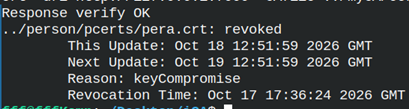 For this certificate we will see that the certificate has been revoked. For this certificate we will see that the certificate has been revoked. |
The possible answers for OCSP service are "good, revoked, unknown".
Mutual TLS With the Web Client
We can use "s_server" and "s_client" to show how mutual TLS verification works. I will start it in the new tab. My working directory is "iCA".
I will start "s_server". I will use port 8443. |
openssl s_server -accept 8443 -cert ../server/scerts/server.crt -key ../server/sprivate/server.key -cert_chain ./ipublic/CA-chain.crt -Verify 1 -CAfile ../myCA/certs/myCA.crt -verify_return_error -www |
 We will get interactive prompt. We will get interactive prompt. |
"-Verify 1" option means that we are allowing only one intermediate CA. Root CA "myCA.crt" is trusted, and below it there can be only one intermediate certificate in the chain "CA-chain.crt". | Option "-www" means that "s_server" will run like a simple web server. |
We will connect with "s_client" to our server. |
openssl s_client -connect localhost:8443 -cert ../client/ccerts/client.crt -key ../client/cprivate/client.key -cert_chain ./ipublic/CA-chain.crt -CAfile ../myCA/certs/myCA.crt -verify_return_error -showcerts |
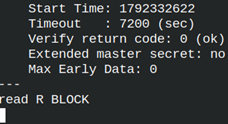 | This is interactive prompt on the side of the client. Here we can enter this message: GET / HTTP/1.0As a response we will get a long text. That text is HTML page containing TLS connection information. | 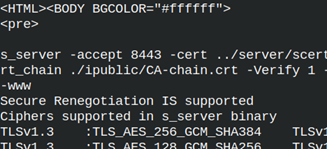 |
Exporting PKCS#12 Key
We can export web client certificate to PKCS#12 format which is convenient for Android and Windows clients. It will go to "cp12" folder.
openssl pkcs12 -export -name "Friendly Name of Certificate" -inkey ../client/cprivate/client.key -in ../client/ccerts/client.crt -certfile ./ipublic/CA-chain.crt -out ../client/cp12/client.p12 # enter password two times |
openssl pkcs12 -in ../client/cp12/client.p12 -info -noout |