Self signed certificates are great for communication between nodes that we have full control of. If we want to make our servers available over the internet, and make them exposed to users, then mutual trust and security must include Certificate Authority. We need CA to sign our certificate.
What is CSR?
If we need CA to sign our certificate, we first must send it what to sign. That is CSR. A CSR (Certificate Signing Request) is essentially an application you submit to a Certificate Authority asking them to issue you a signed certificate. This is one file that we send to CA, CA will verify information from that file, and after successful verification, it will send us back signed certificate.
| First, we create a private key, we type identity information, and from them we create a CSR request. |  |
| After that, we send CSR ( and some money ) to Certification Authority, and then we wait for their answer. During that time, CA will verify the data that we have send them. |  |
What CSR Contains?
| CSR is, in many ways similar, to selfsigned certificate. It has the same three sections. | Data: | Signature Algorithm: | Signature Value: |
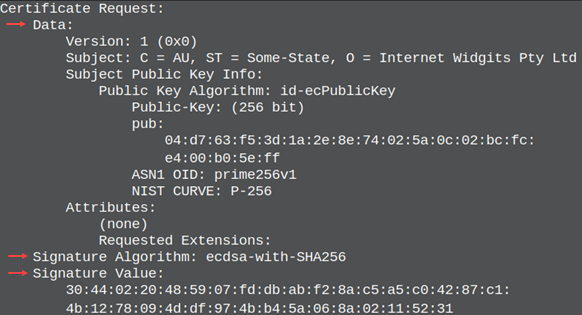 | In the Data: section we have identity data and we have our public key. We used algorithm from the Signature Algorithm: to create that public key and accompanied private key, and we used that private key to sign the CSR. Signature Value: is the same as in the self signed key. We used our private key to sign everything from the Data: and Signature Algorithm: sections.. Signature Value: section contains other two sections signed with our private key. Signature Value: is used to prove that we control the private key that match the public key from the Data: section. Without this anyone would be able to create CSR with our public key. |
There are some things that are missing compared with self signed certificate. It has no Issuer filed, no validity period ( "not before" / "not after" ). CSR is unsigned certificate that is incomplete until CA sign it.
The CSR does not contain a private key. The private key is never shared with anyone. Our CA doesn't have to know our private key.
CSR Verification
Certification Authority will check whether Signature Value: match the public key. Beside that, verification depends on the type of the certificate. There are 3 kinds of certificates: DV, OV, EV. There are also IV certificates.
| Domain Validated ( DV ) These are the cheapest certificates. They will only validate that we control some internet domain. | Organization Validated ( OV ) Beside domain validation, CA will check does our organization really exist. They will search for it in the government business registries and official company databases. They will visit its web site, and will call phone numbers of the organization. | Extended Validation ( EV ) EV is similar to OV, but it is much more expensive and the validation process is more complex. CA will check the physical location of the company. They can send someone for a visit. They will ask government about legal status of the company. They will ask for identity of the person sending a CSR, and they will check if that person has authority to request a certificate in the name of the company. This kind of a certificate is usually an overkill and even big corporation will use OV certificate instead of it. |
Individual Validation (IV) is a type of certificate used to verify a person. The CA will verify your personal identity (passport, ID card, driver's license), verify your physical address, and verify your phone number. This type of certificate is sometimes used to prove that someone owns an internet domain or email address. It is sometimes used to sign documents or software code.
Creation of an RSA Key
| Before we create a CSR, we must create a private key. | cd /home/fff/Desktopopenssl genpkey -algorithm RSA -pkeyopt rsa_keygen_bits:2048 -out private.key |
Private key will have PEM format. 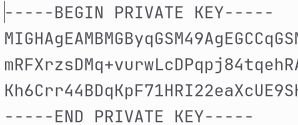 We can read content of this PEM file with " pkey" command => | openssl pkey -in private.key -text -noout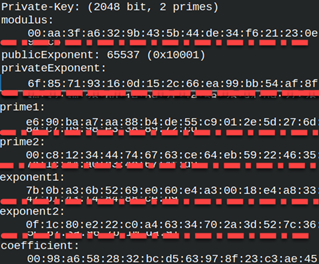 |
Creation of a CSR File
Based on the private key we will create a CSR file. We use req command to create CSR file. openssl req -new -key private.key -out request.csr Just like for a certificate, we will be asked to provide Country, State, City, Department and other data. I will just type Enter each time and I will go through all of the question without providing any data. | 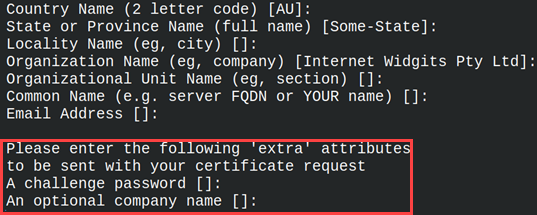 |
On the image above we can see two unfamiliar prompts. At the bottom we will be asked for a "challenge password" and an "optional company name". These are the fields that today don't have any purpose and we should ignore them. They are not used anymore.
CSR file will have familiar PEM format. 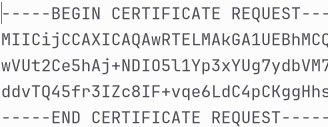 For request we use " req" command. We can use it to read text of the CSR file. openssl req -in request.csr -noout -text | 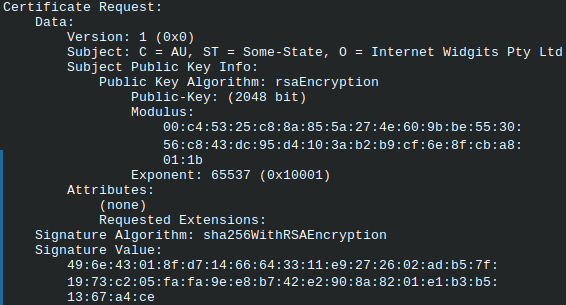 | Notice that fields "C,ST,O" are filled with default values. We have a country, state and organization. This will happen any time we use Enter to walk through CSR prompts. Default values will be used.To make these fields empty we must type dots. |
I will create the same CSR file again, but this time I will type dots. 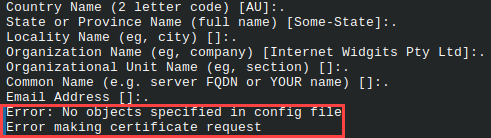 We will get an error, because we must provide at least one field value. | I will run it again, but this time with I will provide a Country.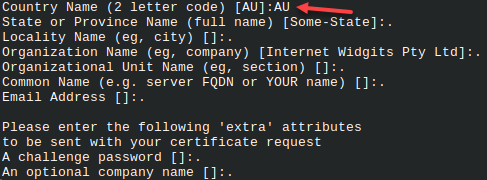 |
We can now read from the request. We will see that only the field for a Country has a value. openssl req -in request.csr -noout -text | 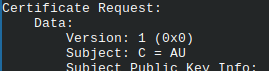 |
How to Create a Key and CSR File with One Command?
| It is possible to simplify creation of a key and CSR. We use this command line. We also used "–subj" option to avoid getting questions. |
openssl req -new -newkey rsa:2048 -noenc -keyout private.key -out request.csr -subj "/C=AU" |
Encryption
When we use "req" command to create a key and a CSR file, we must provide "-noenc" to avoid encryption of a key. When we use "genpkey" command to create standalone key, then we don't have to provide "-noenc" option, because the key will be unencrypted.
openssl genpkey -algorithm RSA -pkeyopt rsa_keygen_bits:2048 -out private.key -aes-128-cbc To encrypt the key, we must provide encryption algorithm. Password must be over 4 characters. | 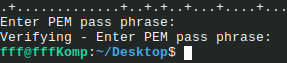 |
If you want to use some other cipher for key encryption, you can search for it with this command. The cipher we used is also here. openssl list -cipher-algorithms | grep "AES-128-CBC" | 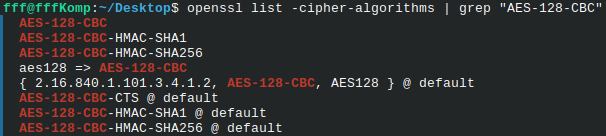 |
Creation of an EC Key
| We can create EC private key with "genpkey" command. | openssl genpkey -algorithm EC -pkeyopt ec_paramgen_curve:prime256v1 -out private.key |
| We already learned that instead of providing a curve, we can provide algorithm name. Algorithm will assume the curve used. | openssl genpkey -algorithm ed25519 -out private.key |
| Based on the EC key, I will create a CSR file with "-subj" option. | openssl req -new -key private.key -out request.csr -subj "/C=AU" |
I will read the content of a private key. openssl pkey -in private.key -text -noout Interesting thing is that we will get both Private and Public key. Opposite from RSA keys, EC public keys are directly derived from the private keys. We get both keys because EC keys are short and it is easy to derive public key from a private key. | 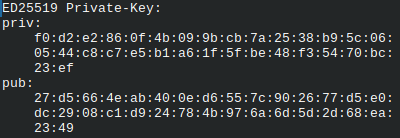 |
Verification of a CSR File
Public key and Signature Value: in CSR file must match. We can verify that with this command. openssl req -in request.csr -verify -noout |  |
Extraction of a Public Key
| We have already saw how to extract public key from a private key. | openssl pkey -in private.key -pubout |
By using redirection we can save this key into a file: openssl pkey -in private.key -pubout > public.pub | 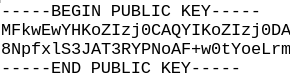 |
| We can do the same with "-out" option. | openssl pkey -in private.key -pubout -out public.pub |
| I will remind you that we can extract public key from a certificate. We did this in an article about self-signed keys. | # openssl x509 -in certificate.crt -pubkey -noout |
The last extraction is from a CSR file.openssl req -in request.csr -pubkey -noout | 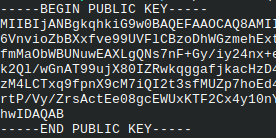 |