Theory Behind Users, Roles and Privileges
Privileges in a Package
If we want to buy instant coffee, we can always buy only one sachet. If we want to buy more, we will buy nicely packaged multiple sachets.  |
Database privileges are permissions that control what actions a user can perform on database objects, such as tables and views. We can organize all of these privileges into hierarchy, just like instant coffee sachets.
| Individual privileges: – SELECT – INSERT – EXECUTE | Roles are named sets of privileges.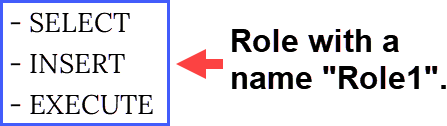 |  | We can then organize roles into hierarchies, so it is really easy to pack and prepare privileges for a specific user. |
Users
| Users are made of two information. When stored in the database, together they make a user account. 1) a user name 2) a password | Now that we now identity of a user, we can make her happy by giving her database privileges. We can grant privileges individually, as a set, or as a hierarchy. 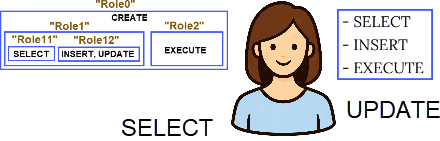 |
We can conclude that Users and Roles are both containers for privileges. The difference is only in one thing.
– Users have one more special privilege. That is the privilege to LOG IN. Users have username and password, but roles don't.
Authority
| There are four major authorities in the PostgreSQL. They differ in a way how they prove their authority and their identity. |
 |
Let's assume that we have a table and someone wants to access that table. The table will first check identity of the someone.
 | If that someone is administrator, he will get all the privileges from the table. |  | Each table knows who is its owner. Owner can do anything with the table. |  | Table will find what privileges does the user have. Only those privileges will be granted. |  | Role is a list of privileges. If those privileges include access to that table, then the access will be granted. |
Although King, Lord and peasant have different social status, in essence they are all humans. It is similar with the Administrator, Owner and the User. All of them are roles in PostgreSQL. These are the same concepts, only the Owner and the Role have some specialties:
– Owner is a role that is registered with the object. Each object can recognize its owner.
– Roles don't have its members hardcoded. Roles can change their members anytime. Roles are not tied to a user account.
Note that roles are defined on the cluster level, but permissions are defined on the database level. One user can be the owner of one database, but could have no rights in another database.
User Creation
| I will login into database " postgres". | sudo -u postgres psql -p 5432 -d postgres | I will create a new role. | CREATE ROLE newUser; |
| We can read about our new role. | SELECT oid, rolname FROM pg_authid WHERE rolname = 'newuser'; | 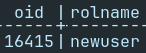 | This role has no password, so how will it log in? |
ALTER ROLE newUser WITH LOGIN; ALTER ROLE newUser WITH PASSWORD 'fff'; | We must explicitly give our user the rights to login and to have password. Only then we will be able to access "postgres" database. |
| But this is still not enough. We have to allow users to login with their passwords. | Current configuration is that only users which have the same name on Linux and on PostgreSQL can log in from the local computer. This kind of authentication is called "peer" authentication. |
I will open configuration file "pg_hba.conf" in a separate terminal tab. I will scroll to the bottom of the file. There we can see that for local computer, for all databases, PostgreSQL will use "peer" authentication. sudo nano /etc/postgresql/18/main/pg_hba.conf |  |
It is great that we already have one line for "postgres" user and the other one for all other users. Inside of that second line I will change "peer" authentication to "scram-sha-256". That authentication will allow users to login with passwords. |  |
sudo systemctl reload postgresql | We have to reload our daemon after this change. |
psql -p 5432 -U newuser -d postgres | I will login by using other terminal tab. We have to use lower letter "u". |
exit | I will logout from being a "newuser". |
DROP ROLE IF EXIST newuser; | I will go back to tab where I am admin. I will delete that user. |
Any identifier without quotes will have its name transformed to lower letters. That is why instead of the newUser we have to use newuser.
Create User with One Statement
| We can create a user with only one statement. Then we can log in. | CREATE ROLE newuser WITH PASSWORD 'fff' LOGIN; #run as admin |
psql -p 5432 -U newuser -d postgres 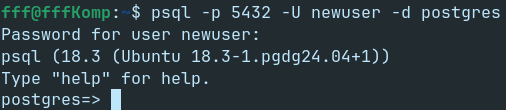 | As a new user I will try to read from the system table "pg_authid". SELECT * FROM pg_authid; #we will get an error |
Problem is that table pg_authid contains password hash and that is why it is not avaiable to ordinary users, only to admins.  | Instead of it we can use virtual table pg_roles.SELECT rolname FROM pg_roles WHERE rolname='newuser';  |
As alternative we can also use this command.\du+ #describe users |  |
Notice on the last image that administrator "postgres" has many attributes. User "newuser" has none of them X.
Role Attributes
We can give "newuser" role the same attributes that administrator has. I will run this command below as an administrator. |
ALTER ROLE newUser SUPERUSER CREATEDB CREATEROLE REPLICATION BYPASSRLS CONNECTION LIMIT 10 VALID UNTIL '2026-12-31' PASSWORD NULL LOGIN; # PASSWORD NULL will delete the password of this role. |
Because "newuser" now has superuser powers, he can read from "pg_auth_id". SELECT * FROM pg_authid; If we use the command " \du+", we will see the new status for the "newuser". |  |
I will just describe what all of these attributes do.
- SUPERUSER – everyone with this role will be excluded from any authorization checks. They will be administrators.
- CREATEDB – anyone with this role will have ability to create new databases.
- CREATEROLE – with this role we can create and alter roles. We can not create and alter superuser roles.
- REPLICATION – this role will give someone power to start streaming replication.
- BYPASSRLS – with this role we will ignore row level security in PostgreSQL.
- CONNECTION LIMIT – we can limit this role to only several concurrent connections.
- VALID UNTIL – after this date, the password for this role will be no more valid.
I will now turn off all of these attributes, except the "CREATEDB". Connection limit is disabled with the number "-1", and VALID UNTIL with "infinity". Attributes that are not mentioned will not be changed. |
ALTER ROLE newUser NOSUPERUSER NOCREATEROLE NOREPLICATION NOBYPASSRLS CONNECTION LIMIT -1 VALID UNTIL 'infinity' PASSWORD 'fff'; |
I will try to create a new database ( CREATEDB power ). CREATE DATABASE newbase TEMPLATE template0; #works DROP DATABASE newbase; #works | We can only base new database on template0, because we have no access to template1. We can delete the database because we are its owner. We can not delete other databases. |
We can observe user attributes from this table. SELECT * FROM pg_user; |  |
All of these attributes are available if we use CREATE ROLE instead of ALTER ROLE, too.
CREATEROLE attribute
| I will create new user and I will give him ability to create roles (as an admin). | CREATE ROLE roleMaster WITH PASSWORD 'rm' LOGIN CREATEROLE; |
| I will login as this new user in other terminal tab. | psql -p 5432 -U rolemaster -d postgres |
As "rolemaster" user, I will try to create another role. CREATE ROLE rmRole; #this will work |  |
| I will go back being admin and I will delete these two new roles. | DROP ROLE rolemaster, rmrole; |
ALTER ROLE
We already saw most of the attributes that can be changed using ALTER ROLE statement. Here, we will only see how we change the name of some role. For that, I will jump to the tab with administrator, and there I will run:
ALTER ROLE newuser RENAME TO newestuser; We can verify the change with the " \du+" command. |  |
Sample Table and ACL ( Access Control )
| As admin, I will create one table. | CREATE TABLE publicTable( Num INTEGER ); |
We can check permissions on this table with command "\dp". |  |
Access privileges ( ACL ) are written like this:postgres=arwdDxtm/postgres grantee=flags /grantor | We can read this last line as: User "postgres" gave privileges "arwdDxtm" to the user "postgres". If grantor and grantee are the same role then that role is owner of the object. We can list the meaning from these privilege codes in the table bellow. |
| Flag | Description | Statement | Refer to | Flag | Description | Statement | Refer to | |
| a | Insert data | INSERT | Table, Column | D | Delete all data | TRUNCATE | Table | |
| r | Read data | SELECT | Table, Column, Sequence | x | Reference | REFERENCES | Table, Column | |
| w | Write, update | UPDATE | Table, Column, Sequence | t | Trigger | CREATE TRIGGER | Table | |
| d | Delete data | DELETE | Table | m | Maintain | VACUUM, ANALYZE, REINDEX | Table |
For some other objects, it is also possible to use these ACL codes.
| Flag | Description | Statement | Refer to | Flag | Description | Statement | Refer to | |
| C | Create new object | CREATE | Database, Schema, Tablespace | c | Database connection | Database | ||
| T | Temporary object | CREATE TEMPORARY | Table | X | Execute | CALL, SELECT | Procedures, Functions | |
| U | Usage | Domain, Language, Type… |
PUBLIC Role
From another tab, the user "newestuser" will try to read this new table.SELECT * FROM publicTable; #he will be denied |  |
Again, as administrator I will give access rights to the role "public". GRANT ALL PRIVILEGES ON TABLE publicTable TO public; Now, the user " newestuser" can read from "publicTable". |  |
If we now use "\dp" command, this is what we will get. I will reformat the result:postgres=arwdDxtm/postgres + Blank means PUBLIC. PUBLIC role has all of the permissions ( arwdDxtm ). | 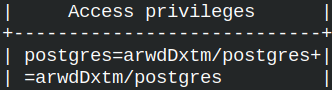 |
Every privilege that was given to "public" role is automatically inherited by all of the other roles. Because anyone can access this table now, this is the same as if would remove any access protection from this table. All the roles, by default, inherit from the "public" role. Public role is a special role and we will never find it in the system tables.
REVOKE ALL PRIVILEGES ON TABLE publicTable FROM public; | I will revoke privileges from the PUBLIC role. |
Combining Roles
User can jump between roles, or he can take a role that contains privileges from many roles.
Taking Different Roles
| As administrator we can take any other role. | SET ROLE newestuser; |
If we now try to delete "publicTable", we will be informed that we can not do it. This is because we are now acting as a "newestuser" role. |  |
This will read our current role: SELECT CURRENT_ROLE; | 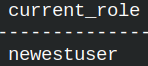 | This command will return the role we used to log in.SELECT SESSION_USER; | 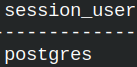 |
SET ROLE NONE; | RESET ROLE; | These commands can be used to reset to the session role. | I will use it. |
Roles Hierarchies
| I will create several roles (as admin). | CREATE ROLE Role1; CREATE ROLE Role11; CREATE ROLE Role2; |
| I will organize them in a hierarchy. On the image we can see that we have three "contains" relationships. We will grant those ownerships. |  |
"role1" contains "role11". " newestuser" contains "role1". " newestuser" contains "role2". | GRANT role11 TO role1; |
I will grant usage of the "publictable" to role "role11". | GRANT ALL PRIVILEGES ON TABLE publicTable TO role11; |
As a user "newestuser" I can now read from the "publictable". "role11" has that power. It gave that power to "role1", and that role delegate the power to the "newestuser". SELECT * FROM publictable; | 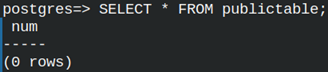 |
User "newestuser" inherits from the "role2". He is now capable to explicitly take that role. SET ROLE role2; With this role, the user can not read from the " publictable". |  |
But, if the user takes the role "role1", he will be able to read from the "publictable". | SET ROLE role1; |
I will create role "zzz" ( as admin ). | CREATE ROLE zzz; |
User can not take this role because it is not granted to him. SET ROLE zzz; |  |
I will grant the role "zzz" to the "role11" ( as admin ). GRANT zzz TO role11; |  |
User will take this role, and will try to read from "publictable". SET ROLE zzz; # SELECT statement will fail |  |
We can conclude that user can take any of the subroles. Superrole has all of the privileges from the subrole, but not the vice versa.
Let's create circular dependency ( as admin ). GRANT newestuser TO role2; # this will fail |  |
NOINHERIT Option
| I will revoke role grants. | REVOKE zzz FROM role11; REVOKE role11 FROM role1; REVOKE role1 FROM newestuser; REVOKE role2 FROM newestuser; |
I will grant "role11" to "newestuser" with NOINHERIT option. GRANT role11 TO newestuser WITH INHERIT false; |  |
I will reset my current role to "newestuser", and I will try to read from the public table. RESET ROLE; #will fail |  |
With NOINHERIT option, we first must take the role before we can use its privileges. SET ROLE role11; #will succeed |  |
INHERIT is default option. It means that we can use subroles privileges at any time. With NOINHERIT option we must explicitly take the role before we can use its privileges. I will renounce my grant "REVOKE role11 FROM newestuser;".
"ROLE" and "IN ROLE"
| There is another way how we can create roles hierarchy. We can do it during the creation of the roles. | I will delete some roles. DROP ROLE role1; DROP ROLE role2; DROP ROLE zzz; |
I will again create the role "role1". CREATE ROLE role1 WITH ROLE newestuser IN ROLE role11; | ROLE newestuser will grant "role1" to " newestuser". IN ROLE role11 will grant " role11" to "role1". |
| The final result will be a hierarchy. Similar to one we created earlier. |  |
As user, I will try to read from the "publictable". SELECT * FROM publictable; # this will work |  |
"ROLE" and "IN ROLE" by default use option INHERIT.
SET FALSE
We saw that the user can always take the roles that are granted to him with SET ROLE command. This is not true. It is possible to grant role to some user, but to take his ability to SET the role.
I will revoke "role11" from "role1" ( as admin ). REVOKE role11 FROM role1; | I will grant it again but this time without SET option. GRANT role11 TO role1 WITH SET false; |
As a user, I will try to set the role "role11". This will not be allowed. SET ROLE role11; |  |
I will revoke it again ( as admin ). REVOKE role11 FROM role1; | I will give it again with the SET option equal to TRUE ( default ).GRANT role11 TO role1 WITH SET true; |
Now the user will be able to take the role "role11". |  |
Who Inherits Whom?
SELECT oid, rolname FROM pg_roles WHERE rolname IN ( 'role1', 'role11', 'newestuser' ); | 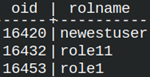 | We can find IDs of roles in the table "pg_roles"; |
We can see relationship between the roles in the table "pg_auth_members". SELECT * FROM pg_auth_members;  | 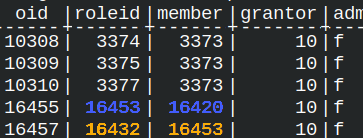 | "Member" column shows the role that is inheriting power from the "roleid" column. We can see that 16420 is inheriting power from 16453. Role 16453 is inheriting power from the 16432. |
ADMIN option
When we get some role, we can regift it. We can do this only if we have ADMIN OPTION.
WITH ADMIN option
For this demonstration I will create one more user ( as admin ). CREATE ROLE bestUser WITH PASSWORD 'fff' LOGIN; | The "newestuser" has "role1" granted to him. Is this user able to grant this role to someone else? |
As "newestuser" I will try to grant "role11" to "bestuser". GRANT role1 TO bestuser; #this will fail |  |
As admin, I will revoke "role1" from "newestuser". REVOKE role1 FROM newestuser; | Then I will give it again, but this time with the ADMIN OPTION. GRANT role1 TO newestuser WITH ADMIN OPTION; |
"newestuser" now has ADMIN OPTION and that will give him more power. GRANT role1 TO bestuser; #with ADMIN OPTION, this will succeed |  |
"bestuser" now inherits "role1". "role1" inherits "role11". That means that "bestuser" can read from the "publictable". |  |
In the third tab of terminal, as "bestuser", I will try to read from the "publictable". psql -p 5432 -U bestuser -d postgres SELECT * FROM publictable; #this will work |  |
Role attribute: ADMIN
We already saw, how to create role hierarchy, with CREATE ROLE statement. -- CREATE ROLE role1 WITH ROLE newestuser IN ROLE role11; | ROLE newestuser – this part was used to make "newestuser" to inherit powers from the "role1". This grant didn't include ADMIN OPTION. |
There is a version of this command where ADMIN OPTION is included. CREATE ROLE role1 WITH ADMIN newestuser IN ROLE role11; | Instead of ROLE, we should use ADMIN. In that case "newestuser" will inherit "role1", but with the ADMIN OPTION enabled. |
We can say that "newestuser" is now administrator of the "role1".
ADMIN, SET, INHERIT
We can observe ADMIN, SET, INHERIT characteristics of a role by using command:\drg | 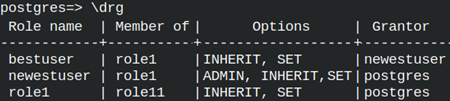 |
Cleaning the Stage
If we try to delete "role11", that will not be possible. DROP ROLE role11; |  |
First, we have to take "publictable" privilege from this role. | REVOKE ALL PRIVILEGES ON TABLE publictable FROM role11; |
| After that we can delete this role, together with other roles. | DROP ROLE role1, role11, newestuser, bestuser; |
I will also delete the "publictable". | DROP TABLE publictable; |