Creating Intermediate CA
Intermediate CA is almost the same as the root CA. We will follow the same steps; there will some small differences. I will use the name "iCA".
Intermediate CA File System
Everything needed for "iCA" must be placed into one file system. At the top we will have "iCA" folder, other files/folders are inside of the "iCA" folder.
| iprivate | This is a folder where we will store the "iCA" private key. |
| inewcerts | Every certificate signed by the "iCA" will be stored here. Names of the files will be certificate serial numbers. This folder is used by OpenSSL to keep track of issued certificates, revocations, and duplicates. |
| iindex.txt | This is file that stores a list of all of the issued certificates.V 280101120000Z 1000 unknown /CN=server1 # valid |
| iserial.txt | This file will store the serial number for a new certificate. If that number is "X", the next certificate will be given serial number "X", and OpenSSL will update this text file to store the next serial number, which would be "X+1". |
| icerts | This directory is optional. Here we can place any certificate, and we can give meaningful names to those files. We can store here "iCA" certificate, and we can organize certificate chains for deployment. |
| icsr | Convinient folder where we can place intermediate CA CSR's. |
| icrl | This is folder where we keep our CRL list. |
| icrlnumber.txt | This file is similar to "serial". It holds the number for the next version of CRL list. |
| iCA.cnf | This is configuration file used by the "iCA". |
As we can see, everything is the same as for the root CA. I will use prefix "i" to differentiate root CA and intermediate CA files.
Permissions should be the same as for the "myCA" directories and files. I will not repeat those settings here.
Creation of the File System
cd /home/fff/Desktop | This is our current directory. | |
mkdir | We will make root folder. We will jump to that folder. | cd iCA |
mkdir | This empty folder is for a private key. | |
mkdir | Issued certificates will be stored here. | |
touch | Here we will register newly issued certificates. | |
touch | Inside of this file we will write initial hexadecimal serial number 5010. | echo 5010 > serial.txt #even number of digits |
mkdir | This folder is optional. | |
mkdir | Here we will place CSRs for leaf certificates. | |
mkdir | Empty folder for CRL files. | |
touch | We will set initial hexadecimal serial number for CRLs, in this file. | echo 5010 > crlnumber.txt #even number of digits |
Creation of the iCA Configuration File
[ca] | "[ca]" is one of the main sections. We will immediately refer to specialized section "[ca_default]". |
[CA_default] database = ./serial = ./certs = ./certificate = ./crl_dir = ./crl = ./crlnumber = ./default_days = 365 default_crl_days = 30 default_md = sha256 copy_extensions = none crl_extensions = crl_ext x509_extensions = v3_server policy = policy_leaf_certificate unique_subject = no | Not much is changed here. Every folder/file has an "i" prefix. Length of the certificate is 365 days. That is shorter than 730 days for CA certificate. Option " x509_extensions" refer to section with default extensions that this intermediate CA will use when signing a leaf certificate. |
[req] | These settings are used for intermediate CA certificate. We will not provide any extensions for this certificate. Extensions, for intermediate CA, will be determined by the CA configuration file. |
[intermediate_ca_dn] | These values will be used as intermediate CA distinguish name. |
[policy_leaf_certificate] countryName = optional stateOrProvinceName = optional localityName = optional organizationName = optional organizationalUnitName = optional commonName = supplied | Distinguish name in leaf CSRs must match the same values in this configuration file. If they do not match then this intermediate CA can not sign that CSR. – match – they must match perfectly.– supplied – value doesn't have to match, but CSR should provide some value. – optional – whatever. There is no restriction. |
[v3_server] basicConstraints = critical,CA:false keyUsage = critical,digitalSignature extendedKeyUsage = serverAuth subjectKeyIdentifier = hash authorityKeyIdentifie = keyid:always,issuer authorityInfoAccess = @issuer_info crlDistributionPoints = @crl_info | These are extensions that will be used when we sign some server certificate. These are the default extensions that will be used if we don't provide "-extensions" command line option.For clients and users we will have to specify their extensions with the " -extensions" command line option. |
[client_cert] | These are certificate extensions that are specific for client certificates. |
[usr_cert] | These are certificate extensions that are specific for user certificates. |
[v3_ocsp_responder] | For signing OCSP responds, we will use these extensions. |
[issuer_info] | Here we can find intermediate CA certificate. Here is the address of the OCSP service. |
[crl_info] | Here are location and extensions of the CRL file. |
We will create configuration file "touch iCA.cnf", and we will copy the text from above into that file.
Creating Private Key and Certificate for Intermediate CA
| We will create private key for intermediate CA. | openssl genpkey -algorithm ed25519 -out iprivate/iCA.key |
We can read from this key. openssl pkey -in iprivate/iCA.key -text -noout | 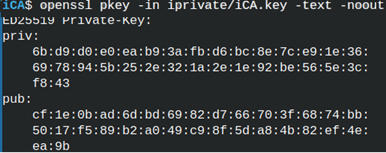 |
| Next step is to create CSR file for intermediate CA. | openssl req -new -config iCA.cnf -key iprivate/iCA.key -out icsr/iCA.csr |
We can read and verify this CSR in one step. openssl req -in icsr/iCA.csr -noout -text -verify | 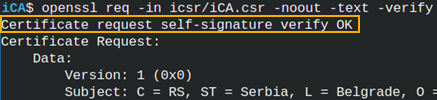 |
Creation of the Intermediate CA Certificate
For CA to sign our CSR request, we must first copy that request. We are copying it into "myCA" folder. cp icsr/iCA.csr ../myCA/icsr/iCA.csr | 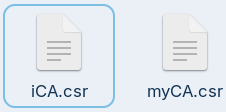 | I will jump to "myCA" folder.cd ../myCA |
openssl ca -config myCA.cnf -extensions v3_intermediate_ca -in csr/iCA.csr -out ../iCA/icerts/iCA.crt 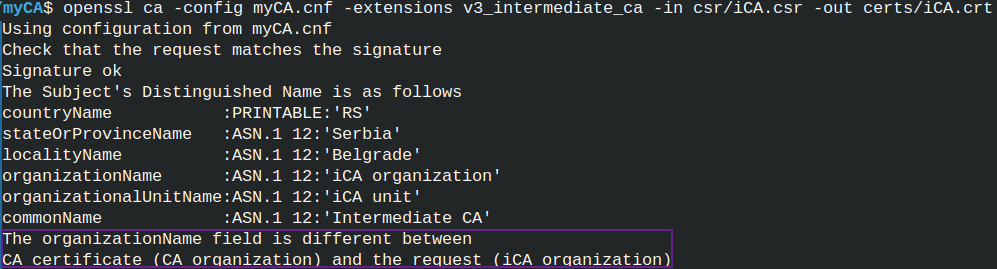 | We are now ready to sign intermediate CA certificate. We will use "ca" command.We have a problem. In the DN section, organization name is different between CSR file and CA configuration file policy. We have to correct that. I will correct intermediate CA configuration file, and I will again generate CSR file. |
 | cd ../iCAcp icsr/iCA.csr ../myCA/csr/iCA.csr |
cd ../myCA  | I will sign CSR file again. This time I will be asked to sign the certificate. I will confirm that. |
 | We will be asked to update "index.txt" file. When using "ca" command everything will be updated. |
Verifying Changes
We can read from our certificate. cd ../iCA We can see that extensions are taken from the " myCA" configuration file.We can also notice that " authorityKeyIdentifier" doesn't include issuer data. It seems that this version of OpenSSL doesn't do that. | 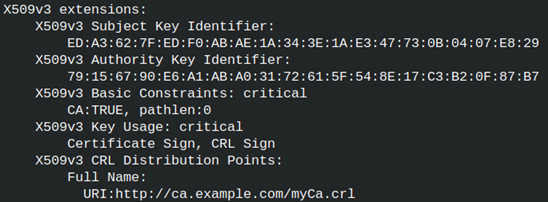 |
We can verify our intermediate CA certificate. We are using CA certificate to verify intermediate CA certificate. openssl verify -CAfile ../myCA/certs/myCA.crt icerts/iCA.crt |  |
This time we will check whether intermediate CA certificate is revoked or not. For that we will use "myCA.crl" file. openssl verify -CAfile ../myCA/certs/myCA.crt -CRLfile ../myCA/crl/myCA.crl -crl_check icerts/iCA.crt  Certificate is not revoked. |
Problem is that we want to check all CRL files in the chain. I will create an empty CRL file for "iCA". openssl ca -config iCA.cnf -gencrl -out icrl/iCA.crl |
We now have two CRL files. One is for "myCA" and the other for "iCA". We can provide only one file in the option "-CRLfile". Solution is to concatenate these two files into one. cat ../myCA/crl/myCA.crl icrl/iCA.crl > /home/fff/Desktop/all.crl | 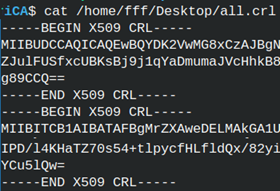 |
I will use this concatenated file to verify intermediate CA certificate. openssl verify -CAfile ../myCA/certs/myCA.crt -CRLfile /home/fff/Desktop/all.crl -crl_check icerts/iCA.crt | 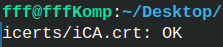 |
Other Changes
This is the first time we created certificate using "ca" command. Many files will change. They will change in the "myCA" folder.
We will have a new entry in the "index.txt" file. Because we used "ca" command to create a certificate, we now have one valid entry. |
 |
The number in the file "serial.txt" is increased to 2731. That number will be used for the next signed certificate.
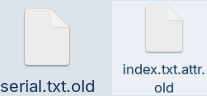 | Two new files appeared. They are both "old" files used for backup." serial.txt.old" holds old serial number 2730.The file " index.txt.attr.old" is a copy that still has a value "unique_subject = no". |