When we read a certificate, we can see the version of the certificate specification at the top. Currently all certificates are using the version No. 3. Each new version had some new features. To avoid creating a new version every time a new feature is needed, extensions are introduced. When we want to add a new feature, we just add a new extension, we don't have to change certificate specification.
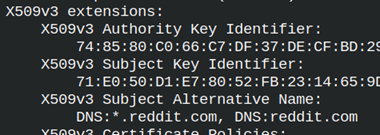
We will take a look at Reddit certificate. In the section "x509v3 extensions", we can find many extensions and their values. We will look at them one by one. openssl s_client -connect reddit.com:443 </dev/null | openssl x509 -text -noout
Reddit Certificate Extensions
Authority Key Identifier and Subject Key Identifier
Reddit certificate is signed by DigiCert CA. DigiCert has its public key. SHA1 hash of that public key is calculated and we can see it here in this field.
Subject key identifier is SHA1 hash of the Reddit public key.
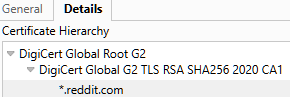
The purpose of these fields is to identify certificates that make a chain. If we take a look at Reddit certificate chain, we will see three certificates. The first two belongs to DigiCert root and intermediate certificates.
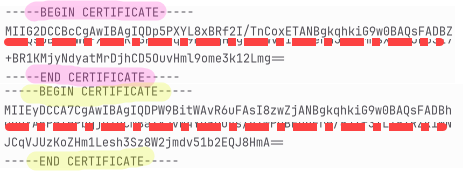
We can use "-showcerts" to export the certificate chain to a file. Inside of that file, we will find intermediate and leaf certificate. Root certificate is in the folder with other root certificates that our OS trust "/etc/ssl/certs".
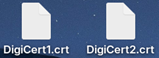
I will copy these two certificates into two separate files with names "Digicert1.cert" and "Digicert2.cert". Then we can read the content of these files. I am only interested into AKI and SKI fields. cd /home/fff/Desktop openssl x509 -in DigiCert1.crt -text -noout openssl x509 -in DigiCert2.crt -text -noout
DigiCert1 is a leaf certificate.
DigiCert2 is intermediate certificate.
Notice that leaf AIK is the same as intermediate SKI.
Now, we only miss connection between root and intermediate certificate.
I will find the root certificate in my Linux OS certificate store. cd /etc/ssl/certs ls | grep DigiCert_Global_Root_G2.pem
I will read AKI and SKI from the root certificate. openssl x509 -in DigiCert_Global_Root_G2.pem -text -noout This is self-signed certificate, so there is no AKI, only SKI.
Root certificate SKI is the same as AKI for intermediate certificate.
Now we can reconstruct the whole certificate chain.
Reading of AKI and SKI
We can read only AKI and SKIextensions, not the whole certificate. openssl s_client -connect reddit.com:443 </dev/null | openssl x509 -noout -extauthorityKeyIdentifier,subjectKeyIdentifier
Subject Alternative Name
When we connect to some web site and we download that site certificate, inside of that certificate we must find the URL of that site. That is how clients verify certificates.
We can verify that certificate is valid for our web site with this OpenSSL command. openssl s_client -connect www.reddit.com:443 -verify_hostname www.reddit.com
Todays web browsers are only checking this SAN field. They are never verifying CN field.
I will remind you that for URL we can use domain, wildcard domain and multidomain.
example.com – valid only for that URL.
*.example.com – valid for the first level subdomains. It will match any address like "users.example.com" or "info.example.com". It will not match two or more levels subdomains like "info.users.example.com".
DNS:example.com, DNS:google.com – now we can use the same certificate for multi domains.
DNS:example.com, DNS:*.example.com, DNS:*.*.example.com – we can set our certificate to be valid for multidomans, wildcard domains with different subdomain levels, so any combination is possible.
SAN is not only for web sites addresses. We can also use: email: URI: RID: otherName: RID is "registered object identifier". "otherName" is for custom identifiers.
X509v3 Subject Alternative Name:
       email:admin@example.com,
       URI:https://example.com/service
We can read only the SAN field, with option "subjectAltName". openssl s_client -connect reddit.com:443 </dev/null | openssl x509 -noout -extsubjectAltName
Certificate Policies
Here, we can see web page with CPS ( Certification Practice Statement ). There we can find legal/technical PDFs published by the CA that describes in detail how they protect private keys, how they verify identities, what is procedure for revocation.
This certificate was issued according to policy 2.23.140.1.2.2. This is not CA's policy. This is official policy issued by the "CA/Browser Forum". This organization have members that are major stakeholders in the PKI infrastructure. It includes CAs, web browser vendors, OS creators, email server providers and others.
These policies mostly explain how thoroughly the identity of the certificate owner was vetted before issuance. We already talked about OV, DV, IV, EV certificates. These policies refer to these different kinds of verification. Some of the most popular policies are:
2.23.140.1.2.2
2.23.140.1.2.1
2.23.140.1.2.3
2.23.140.1.1
2.23.140.1.4.1
Organization Validated
Domain Validated
Individual Validation
Extended Validation
Code Signing
We can extract certificate policies from a certificate with this option. openssl s_client -connect reddit.com:443 </dev/null | openssl x509 -noout -extcertificatePolicies
Key Usage
The Key Usage extension specifies what cryptographic operations the certificate's public key is allowed to perform. Our key can only be used for signing. This extension is marked as "critical". If a client doesn't understand this "critical" extension, it should reject the certificate with this extension.
"Key Encipherment" means that the key can be used for signing other keys. This is only important and useful for RSA keys.
There are many different usages that we can provide in this extension:
Digital Signature
For signing certificates, code, files.
Content Commitment
Signing can not be later denied. For legal documents.
Data Encipherment
For signing data directly. Rarely used.
Key Agreement
The key can participate in key agreement protocols ( DH of ECDH ).
Certificate Sign
Can sign certificates.
CRLSign
Can sign certificate black lists.
Encipher Only
Only for encryption.
Decipher Only
Only for decryption.
Key usage options are usually used in these combinations.
Signatures → Digital Signature, Content Commitment
Encryption → Key Encipherment, Data Encipherment
Key exchange → Key Agreement, Encipher Only, Decipher Only
CA operations → Certificate Sign, CRL Sign
We will only read key usage option from a certificate. openssl s_client -connect reddit.com:443 </dev/null | openssl x509 -noout -extkeyUsage
Extended Key Usage
The Extended Key Usage extension specifies forwhat scenarios a key may be used. Our key can only be used to authenticate a TLS/HTTPS server.
These are possible application scenarios that we can use the key for.
TLS Web Server Authentication
For server authentication.
TLS Web Client Authentication
For client authentication.
Code Signing
For signing code.
E-mail Protection
For email certificates.
Time Stamping
Server that proves the time of signing.
OCSP Signing
For signing certificate white lists.
We can read only the data about extended key usage. openssl s_client -connect reddit.com:443 </dev/null | openssl x509 -noout -extextendedKeyUsage
CRL Distribution Points
Sometimes certificates get revoked. That can happen because the private key is compromised or domain ownership changed. The problem is how to inform a client that some certificate is no more valid. This can be done with certificate revocation lists.
This extension will give us URL through which we can download a list of revoked certificates. This list is refreshed by the CA every few hours. We should not trust the certificates that are on this list.
There will be usually two URLs for redundancy. The URLs do not use HTTPS, but HTTP because their content is public, and it is signed by a CA so that no one can compromise the integrity of such a list. Let's learn a little bit more about certificate revocation lists ( CRL ).
How to Get onto Revocation List?
When you feel that something is wrong with your certificate, you can contact your CA and declare that your certificate should be revoked. Another possibility is that the CA revokes your certificate if there is evidence that some suspicious activity is being performed with that certificate.
Sometimes it is a good idea to purchase a certificate and then immediately try to revoke it. It is possible that the CA does not offer certificate revocation. It is also possible that the clients we use cannot read CRL services or are misconfigured. We want to test that.
Some modern environments don't use CRLs because the downloaded file is big in megabytes, and because the list is refreshed every few hours, the data in these lists is stale. Today, we have a better technology, OCSP, which we will discuss later.
How to Download CRL List?
CRLs are typically downloaded every few hours and then cached. I will download CRL file using URL from Reddit certificate. wget http://crl3.digicert.com/DigiCertGlobalG2TLSRSASHA2562020CA1-1.crl
I will get a file with this name. The file size is 9.7 MB. DigiCertGlobalG2TLSRSASHA2562020CA1-1.crl
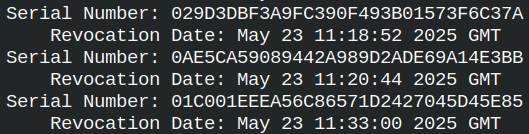
We can read this file with "crl" command. This is usually a binary file with DER format. Because this file is long, I will read only the first 100 lines. Most lines will be serial numbers of a certificates. openssl crl -in DigiCertGlobalG2TLSRSASHA2562020CA1-1.crl -inform DER -text -noout | head -100
If we look for Reddit certificate serial number, we will not find it inside of this list, so that certificate is not revoked. openssl crl -in DigiCertGlobalG2TLSRSASHA2562020CA1-1.crl -inform DER -text -noout | grep "0e:9e:4f:5d:82:fc:c4:14:5f:d8:8f:d3:9c:2a:31:11"
Getting Only the CRL Extension
With option "crlDistributionPoints", we can separately read only the CRL list addresses. openssl s_client -connect reddit.com:443 </dev/null | openssl x509 -noout -extcrlDistributionPoints