Different Formats
Base64
Secret keys (RSA, EC, AES) are just big numbers. Any number can be represented in binary as a string of ones and zeros. For example, the number 199 can be represented as "11000111". For historical reasons, we don't want to store and share our keys as binary numbers.
Many historical technologies were built only for text exchange. Such as email, text editors, terminals. Some technologies can work with binary data, but are better suited for text (such as XML and JSON). This is why we want to store our private and public keys as text.
For better compatibility, we want to limit ourselves to only those letters and other characters that are universally understood. Base64 uses an alphabet of only 64 characters ("A-Z, a-z, 0-9, +, /"). If we do not practice text simplicity with a limited number of characters, we risk our keys becoming corrupted and invalid during manipulation.
Base64 works by simple substitution, so number 199199199, which is "11000111 11000111 11000111" in binary format, can be represented as "x8fH" in base64 encoding. That is why the keys look like a sequence of random alphanumeric characters. Each character represents 6 binary numbers, so our key will be shorter.
| 000000 | 000001 | 000010 | 011010 | 011011 | 011100 | 110100 | 111101 | 111110 | 111111 | 110001 | 111100 | 011111 | 000111 |
| A | B | C | a | b | c | 0 | 9 | + | / | x | 8 | f | H |
PEM Format
When we create a new key, it will be in base64 format. cd /home/fff/Desktopopenssl genpkey -algorithm ed25519 -out private.key |  |
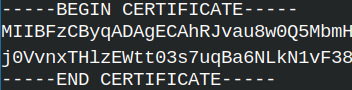
We can easily send and copy this key. Inside of the file, we also have text that is telling where is the start and end of our key. If we see such file, the file is in the PEM format ( Privacy-enhanced Mail ). This is the most used format for storing and sending cryptographic files.
DER Format
| DER file format is a binary format. We can easily transform PEM file into DER file in 2 steps: – First we remove " BEGIN/END PRIVATE KEY" text. – Then we decode base64 into zeros and ones. |  |
DER ( "Distinguished Encoding Rules" ) is much more than pure binary format. While keys are just big numbers, certificates contain text, dates, fields and structure. Certificates are also base64 encoded, while in PEM format. To get a readable format, we must base64 decode them into binary format and then to encode them again into English language format. |  |
Mapping between binary format and English language must be deterministic and precise. That is why DER format is important. This format tells us how fields are encoded, how strings/dates are encoded, how the structure is encoded. There is no place for ambiguity and obscurity.
DER file format is used by software, it is not for humans. For software DER files are smaller and easier than PEM files.
PKCS#12 Format
PKCS#12 is a standardized file format for storing and transporting cryptographic material in a single file. This file can contain a private key and the whole chain of certificates. It is cumbersome to manage a key and all of the certificates separately. It is much more convenient to pack everything into one "suitcase". That makes importing, distributing, backing up, much more convenient.
PKCS#12 files are usually encrypted. Encryption protects the content and integrity of a file.
PKCS#12 files are used by organizations to provide authentication of the users. Users add those files into browsers, email clients, smart cards. Windows heavily uses PKCS#12. Some servers, like Microsoft IIS, prefer cryptography files in PKCS#12 format. Mobile device management (MDM) systems distribute client certificates to phones and tablets as ".p12" files.
PKCS#12 files contain keys and certificates in DER format. All of them are encrypted together for safety and convenience. The full name of this format is "Public-Key Cryptography Standards #12".
File Format Extensions
| .pem | Files with this extension can store private keys or certificates. They are in the PEM format. |
| .key | Extension KEY is used for private keys. This extension is used no matter if the keys are in PEM or DER format. |
| .crt | Certificates in PEM format are saved in files with CRT extension. |
| .cer | Certificates in DER format are saved in files with CER file extension. |
| .pfx | This file format extension is used for PKCS#12 files. These files can contain keys and certificates together, or separately. |
| .p12 | Same as above. ".pfx" and ".p12" are the same binary format. |
| .pub | Is used for public keys in PEM format. |
| .csr | Is used for certificate signing requests in PEM format. |
File format extensions are not important for OpenSSL. For OpenSSL is important that content of a file is correctly formatted. We can name our files anyway we want if we work with OpenSSL, but some other programs can be picky.
We said that PKCS#12 standard files are always in binary format. Contrary to that, PKCS#8 and PKCS#10 files are in the PEM format. When we see a key file presented as PEM, internally it is following PKCS#8 standard. Similar to that, ".csr" files are following PKCS#10 standard.
Veryfication of a Key
| I will create one more private key. It will be in the DER format. | openssl genpkey -algorithm ed25519 -outform DER -out privateDER.key |
We can check keys in any format with the option "-check".openssl pkey -in private.key -checkFor DER keys we will use: openssl pkey -in privateDER.key -inform DER -check |  |
Format Conversions
Key Format Conversions
PEM to DER
We have PEM key. Let's convert it into DER format. openssl pkey -inform PEM -in private.key -outform DER -out privateDER2.key | 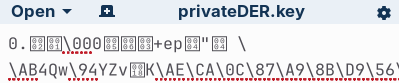 This is binary format DER. This is binary format DER. |
DER to PEM
We can transform our key back to its original format PEM. openssl pkey -inform DER -in privateDER2.key -outform PEM -out privatePEM.key |  |
PEM to PKCS#12
We can place PEM key into P12 container. We must provide a password for PKCS#12 container. openssl pkcs12 -inkey privatePEM.key -export -nocerts -out P12key.p12 -passout pass:1234 |
This is how we can read P12 key. openssl pkcs12 -noenc -info -in P12key.p12 -passin pass:1234 |  |
DER to PKCS#12
It is not possible to directly transform a DER key into PKCS#12. We can do this by using the PEM format as an intermediary.
Certificate Conversion
Certificate Creation
We already now how to create a certificate. Certificate is made by signing CSR file with a private key.
openssl req -new -subj "/CN=Root CA" -addext "basicConstraints=critical,CA:TRUE" -key privatePEM.key -out RootCSR.csr | We create CSR. |
openssl x509 -req -in RootCSR.csr -copy_extensions copyall -key privatePEM.key -days 365 -out RootCert.crt | We make certificate. |
PEM to DER
This is how we can transform PEM certificate into DER certificate. openssl x509 -inform PEM -in RootCert.crt -outform DER -out RootCertDER.crt | 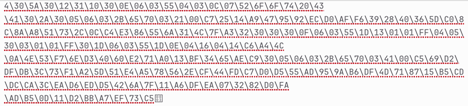 |
We can read DER certificates with x509 command. openssl x509 -in RootCertDER.crt -inform der -text -noout | 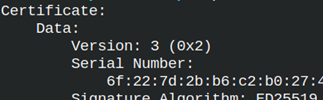 |
DER to PEM
We can transform DER format into PEM format, of a certificate. openssl x509 -inform DER -in RootCertDER.crt -outform PEM -out RootCertPEM.crt | 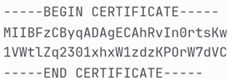 |
PEM to PKCS#12
We use option "-nokeys" to export PKCS#12 certificate from PEM certificate. We must provide a password. openssl pkcs12 -in RootCertPEM.crt -export -nokeys -out RootCert.p12 -passout pass:1234 |  |
If we provide a certificate and a key, we can export them both into PKCS#12 format. openssl pkcs12 -in RootCertPEM.crt -inkey privatePEM.key -export -out KeyPlusCert.p12 -passout pass:1234 |  |
We are working with a self signed certificate. If we had CA signed certificate, then we can add CA certificate inside of the PKCS#12 file too. For that we use "-certfile ca.crt" option. # openssl pkcs12 -in RootCertPEM.crt -inkey privatePEM.key -export -out KeyPlusCert.p12 -passout pass:1234 -certfile ca.crt |
We can export only the key. I will use "-nocerts" to exclude certificates. openssl pkcs12 -inkey privatePEM.key -export -nocerts -out NocertsP12key.p12 -passout pass:1234 |  |
PKCS#12 to PEM
These commands will convert PKCS#12 files back into PEM format. openssl pkcs12 -in RootCert.p12 -nokeys -out NoKeysRootCertPEM.crt -passin pass:1234 # get certificate openssl pkcs12 -in KeyPlusCert.p12 -nokeys -out OnlyRootCertPEM.crt -passin pass:1234 # get only the certificate, without the key |
When exporting the key, we will be asked for a password to unencrypt the key. Our key is unencrypted, so I will use "-noenc" to avoid the question. openssl pkcs12 -in KeyPlusCert.p12 -nocerts -noenc -out NoCertsprivatePEM.key -passin pass:1234 # get only the key, without certificate |
It is possible to export both the key end the certificate. The exported file will have both the certificate and the private key. openssl pkcs12 -in KeyPlusCert.p12 -noenc -out Everything.pem -passin pass:1234 | 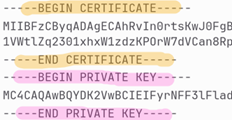 |
PKCS#12 vs DER
It is not possible to convert directly between PKCS#12 and DER files. We can do the conversion indirectly using a PEM file as an intermediary.
PKCS#12 and Certificate Chain
We will download certificate chain from the website www.facebook.com. We will not get root certificate ( it is already on our computer ), but we will get leaf and intermediate certificate. openssl s_client -connect www.facebook.com:443 -showcerts </dev/null > facebook-chain.pem | 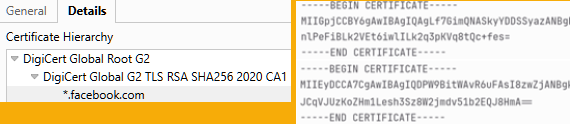 |
We will create PKCS#12 file that has the whole certificate chain. openssl pkcs12 -in facebook-chain.pem -export -nokeys -out facebook-chain.p12 -passout pass:1234 | |
Now we will transform this chain back. We can get both certificates, only leaf certificate, or only intermediate certificates.
This command will return the whole certificate chain. It will include both the leaf and intermediate certificate. openssl pkcs12 -in facebook-chain.p12 -nokeys -out facebook-chain2.pem -passin pass:1234 |
This command should return the leaf certificate. OpenSSL will return the blank file. OpenSSL can not recognize what certificate is leaf certificate. To assert that, OpenSSL must know the private key. The certificate that matches the private key is leaf certificate. Because we do not have the private key, we will get a blank file. openssl pkcs12 -in facebook-chain.p12 -clcerts -nokeys -out facebook-leaf.crt -passin pass:1234 # get leaf ( client ) certificate |
If OpenSSL can not recognize the leaf certificate, then all of the certificates will be considered intermediate. That is why this command will return both certificates, although we asked only for intermediate certificate. openssl pkcs12 -in facebook-chain.p12 -cacerts -nokeys -out facebook-intermediates.crt -passin pass:1234 # get intermediate certificates |
How to Recognize Cryptography File Format?
| We made 3 certificate files. | RootCertPEM.crt | RootCertDER.crt | RootCert.p12 |
To test their format, we must try to open them.
openssl x509 -in RootCertPEM.crt | If this succeeds, this is a PEM file. |
openssl x509 -in RootCertDER.crt -inform DER | This would be DER file. |
openssl pkcs12 -in RootCert.p12 | This will show us that we have PKCS#12 file. Password is "1234". |